Eliminated the intermediate read and write buffers. The protocol (spi at this point) reads and writes directly to the flat buffer. This gave us a ~3KB/s speed increase, and removed a bunch of big buffers from the stack.
I also reduced the verbosity of the debug so there are fewer if(debug) switches in critical paths (not sure it really helped, but take what you can get).
[Send Packet] Length 560
[Send Packet] COBS encoded buffer length: 564
[BPIO] Packet processed in 2986 us
COBs encoding is indeed taking a significant chunk of time.
Something does not add up. Walking through what cobs_encode() does, a back-of-napkin check suggests that 3000us is at least 4x slower than expected for creating 564 encoded bytes.
Encoding is < 90,000 instructions
Relevant part of bus_pirate5_rev10.elf.map, with my commentary in lines starting with #. Note that there is only a single loop … in cobs_encode_inc.
# Code sizes
 .text.cobs_encode_tinyframe
                0x00000000       0x5c CMakeFiles/bus_pirate5_rev10.dir/lib/nanocobs/cobs.c.o
 .text.cobs_encode_inc_begin
                0x00000000       0x24 CMakeFiles/bus_pirate5_rev10.dir/lib/nanocobs/cobs.c.o
 .text.cobs_encode_inc
                0x00000000       0x14 CMakeFiles/bus_pirate5_rev10.dir/lib/nanocobs/cobs.c.o
 .text.cobs_encode_inc_end
                0x00000000       0x24 CMakeFiles/bus_pirate5_rev10.dir/lib/nanocobs/cobs.c.o

# Let's presume this 0xA0 bytes is the loop (executes once per byte to encode)
 .text.cobs_encode_inc.part.0
                0x10004f54       0xa0 CMakeFiles/bus_pirate5_rev10.dir/lib/nanocobs/cobs.c.o
 .text.cobs_encode
                0x10004ff4       0x50 CMakeFiles/bus_pirate5_rev10.dir/lib/nanocobs/cobs.c.o
                0x10004ff4                cobs_encode
# 0x50 above is code size; next function is 0x50 bytes later
 .text.cobs_decode
                0x10005044       0xe4 CMakeFiles/bus_pirate5_rev10.dir/lib/nanocobs/cobs.c.o
                0x10005044                cobs_decode
The loop for a 560 byte buffer:
160 (0xA0) instructions * 560 bytes == 89,600 instructions
If I reviewed the above correctly, this gives an upper maximum of 89,864 instructions to encode a 560 byte buffer.
Estimate one instruction per cycle
cobs_encode() has no floating point, and no division. All instructions are simple increments, memory set, compare, branch, etc.
Branches can take three cycles, conditional branches can take two cycles, but those typically are countered by not executing the jumped-over instructions. Literal loads might take two cycles … but for back-of-napkin checks, I’ll just average everything to one cycle per instruction…
back-of-napkin analysis
An RP2040 at 120MHz has 120 * 10^6 clock cycles per second
Execution of 90 * 10^3 instructions
Calculating the seconds to encode 560 bytes: 90 * 10^3 / 120 * 10^6 == 0.000750 seconds
Since you’re measuring about 4x a worst-case back-of-napkin estimate, it at least suggests something is stalling (memory latency, bus contention, or similar). Proper profiling tools may be helpful to better understand the actual cause … maybe the encoder can be updated to output in native memory size (32-bits) at a time instead of byte-by-byte (e.g., by working in a local size_t variable, then writing it as a single value … with edge case for the last few bytes to be written).
Before going there, however … maybe try a build where the compiler is allowed to fully optimize the code?
Woah, hum. I copied the cobs code to the bpio.c file so I could do so me quick timing on it. This is much more appropriate. However, it’s still stuck at 38KB/s.
[BPIO] RX packet 955us
...
[Send Packet] Sent 560 bytes in 3192us
[BPIO] Handler function executed in 5043us
According to the timings, which I no longer really believe, the USB RX TX loops have slowed to a crawl.
It showed the same timing for COBS previously
Previously packets took ~3.5ms (3000us) and now it takes almost double that, this does account for the cut in speed.
I don’t know what Python is doing under the hood, but doing this in two steps made a lot of delay.
                # Read all available data at once
                available = self.serial_port.in_waiting
                if available > 0:
                    chunk = self.serial_port.read(available)
                    resp_encoded.extend(chunk)

                    # Check if we have the complete message (contains delimiter)
                    delimiter_pos = resp_encoded.find(b'\x00')
Similarly this was reading single bytes which was dead slow. Reading all available and searching for 0x00 is much more efficient.
Moving forward…
It seems like we’re taking a 16KB/s hit with the COBS encoded method compared to the 2 byte header, but some may also be due to the python script still being inefficient.
It seems like a substantial hit, especially with the extra optimizations I’d done since the previous version.
Don’t really know where that hit is
RX is slower because we have to search through bytes for 0x00
Next I’ll do a flash write script and see how long RX packets are impacted.
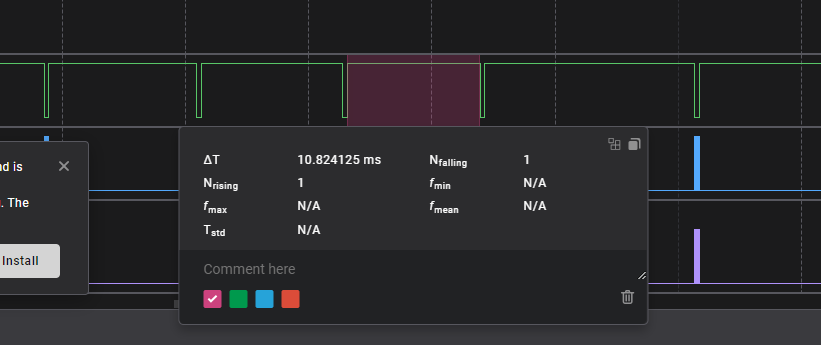
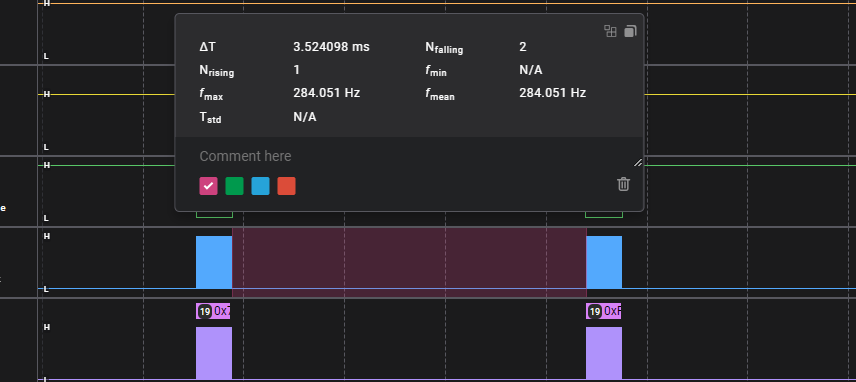
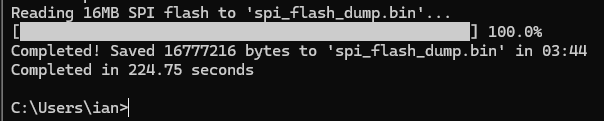
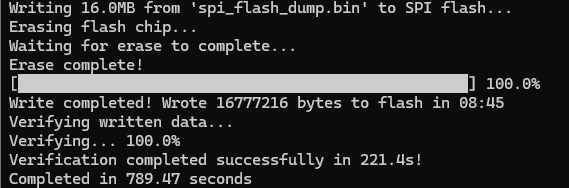
Writing a 16MB flash chip takes about 8:45, the full erase, write, verify took 13 minutes. Looking at the logic analyzer there’s not much we could to to improve on the writes. The first status poll is WIP, the second is finished. If we could poll faster it might shave off some time, but I’m not sure if that is a USB limit or a Python issue.
I’m using flash speed as a proxy for “high throughput data” in general. The goal isn’t really to max out speed on flash chips. If we wanted to do that, we should make a specific mode optimized on flash chips with QSPI read/write if available.
I’m kind of tempted to do a high speed flash mode now that we’ve gone this far. The question is - a new binmode, or a sub-mode of BPIO2? This will need some thought to avoid building a dumpster fire.
To be fair, that’s not exactly an apples-to-apples comparison. If there’s a more efficient framing option, I’d be really interested to learn more.
More likely overhead is in flatbuffers. For example, I’ve read threads comparing protobuf vs. flatbuffers, and protobuf had faster encoding, while flatbuffers had faster decoding.
A couple avenues to explore here:
USB Device Descriptors
IIRC, there’s something in the USB Device Descriptor that indicates the maximum polling rate, but I can’t recall the specifics right now. for example, some “high performance” gaming mice set this to small values to indicate their data changes very rapidly. Maybe it was only in a HID descriptor, or on each interface?
I think the default is 10ms … if that matches what you see, this might be a worthwhile area to investigate. Note, however, that this means there will be more overhead from the host asking for USB updates … a profiler could help understand how much overhead those extra pings from the host would add…
Baud rate … really!
Not as crazy as it may sound, have you tried opening the serial port with settings that indicate a much higher baud rate?
If you really want high-speed data throughput, there are better options than USB CDC. In fact, it might be relatively easy to change the underlying transport for flatbuffers to use one of those other options … and if limiting packet size to 64k or less, might not even need COBs. The downside would be on the client side … enumeration of USB bulk interfaces (for example) is sometimes a bit more opaque (and certainly less universal) than using CDC.
My understanding is that the bus pirate was first and foremost targeting hackers, so the client usability was the key factor (over raw performance).
If you’re really looking to improve performance, there’s nothing as powerful as hard data on where time is actually spent. Segger’s profiling suite is under $2k, IIRC. Might be worth a time/cost analysis, or evaluation of their (or similar) profiling tool?
I’d look for a cobs cargo and try the read and write speed from rust. If you have a flash adapter the time to read an spi flash chip would be interesting. If not I can send you an adapter and chip.
@henrygab I have a reply in progress but won’t be able to finish testing until tomorrow.
It is the project of the protobuffer developer. Flat buffer solves a lot of this, but there are a lot of good improvements. The issue is that the tooling isn’t expansive or actively maintained.
USB device descriptors - I didn’t find anything about timing. I saw a USB high speed option which took me down a rabbit hole of realizing that’s actually USB high speed and not a software setting.
Port speed - I had previously tried 3000000 baud, but then set it back to 115200. I tested again, but unfortunately it doesn’t help.
I’m more theorizing on how a high speed spi flash chip read/write might work. A tailored interface instead of a one size fits all generic control protocol.
Bus Pirate is SPI flash aware (through the SFUD library we already use)
Instead of request-wait-response, stream data from host to Bus Pirate buffer (or vice versa) until buffer is full. Then send periodic requests for more data as needed. This removes all the protocol delay between read/writes which would improve speed significantly.
Implement QSPI interface supported by most modern flash. 4x more data, or the same data at a quarter the bus speed.
That’s because the real delay is the hit to the status register, write enable, then reloading bytes. If the Bus Pirate could check status register and handle write enable the write time would improve considerably.
Putting the flash stuff on the back burner for now. Will finish clean up on the bpio and docs.
The configuration descriptor has one or more interfaces
Each interface can have one or more endpoints (data in / out).
The EndPoint descriptor can indicate a supported maximum polling interval rate.
Note, however, that the operating system and the USB controller are also critical. If there’s multiple devices on a USB 2 controller, and you have a device that’s set to poll every 1ms (maximum polling rate), that will impact the performance of every other peripheral on that USB2 controller. Plug into a USB2 controller with no other peripherals (or maybe a USB3 controller … verification required) for best results when using low polling times (fast polling).
Oh, and it will cause more processing on the firmware, too … maybe irrelevant, but I have no data on the CPU overhead for simple polling…
Edit: 79 kB/s and 94 kB/s respectively for the EEPROM and flash.
Note this is with firmware 070b051, not the latest, as I need to put the Bus Pirate into HiZ mode on connection for important but boring reasons. And bear in mind the wiring setup is: Bus Pirate, probe cable, breadboard, breakout board, SOIC chip .
Boring reasons
The driver struct behaves in different ways depending on the active mode, for instance the I2C methods are only available (literally only implemented) when it is in I2C mode. This is achieved through a generic type parameter (BusPirate<I2c>).
This generic parameter has to be statically known, so on connection the driver puts the Bus Pirate into HiZ mode and the user always gets back a BusPirate<HiZ>.
Unfortunately the type-system requirement that this be statically known means I can’t query the Bus Pirate and just return the struct set to whatever the active mode is.
Second edit: I realise now that the commit message with the latest firmware is “cobs implemented, slow”. Was cobs not implemented before this one? I’ve been sending cobs encoded packets and reading the response bytes with a cobs decoder, and everything has worked as expected.
I’m trying out the Python BPIO interface and am struggling to get it to work.
Setup:
Connect Bus Pirate 5
Update Bus Pirate 5 to latest firmware
Confirm Bus Pirate firmware:
VT100 compatible color mode? (Y/n)> n
HiZ> i

This device complies with part 15 of the FCC Rules. Operation is subject to the following two conditions:
(1) this device may not cause harmful interference, and
(2) this device must accept any interference received, including interference that may cause undesired operation.

Bus Pirate 5 REV10
https://BusPirate.com/
Firmware main branch @ cfddcf8 (Aug 14 2025 12:26:04)
RP2040 with 264KB RAM, 128Mbit FLASH
S/N: <redacted, probably unnecessarily :D >
Storage:   0.10GB (FAT16 File System)

Configuration file: Loaded
Active binmode: SUMP logic analyzer
Available modes: HiZ 1WIRE UART HDUART I2C SPI 2WIRE 3WIRE DIO LED INFRARED JTAG
Active mode: HiZ

Display format: Auto

HiZ>
Clone BusPirate5-firmware in main branch (current commit cfddcf850c8539a636e686c50589fd5f0e710e64).
cd hacks/flatpy
Execute the following in an interactive python3 session.
> python3
Python 3.13.6 (main, Aug 14 2025, 10:05:59) [GCC 11.4.0] on linux
Type "help", "copyright", "credits" or "license" for more information.
>>> from bpio_client import BPIOClient
>>> client = BPIOClient("/dev/serial/by-id/usb-Bus_Pirate_Bus_Pirate_5_5buspirate-if02")
>>> client.show_status()
Timeout waiting for response
Failed to get status information.
>>>
Expected result: Some status information
Actual result: Bus Pirate 5’s LEDs turn red, and above timeout message is printed.
Am I missing something arcane and/or fundamental?
Edited to add:
I’m working in a virtualenv, in which I ran:



 If there’s a more efficient framing option, I’d be really interested to learn more.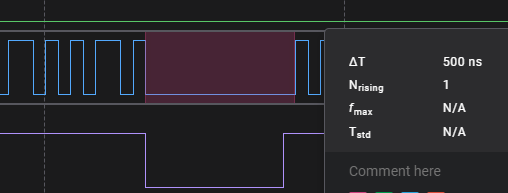
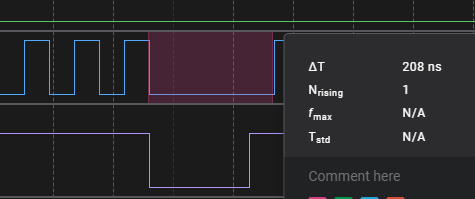
 Not even 1 second difference for the 16MB chip.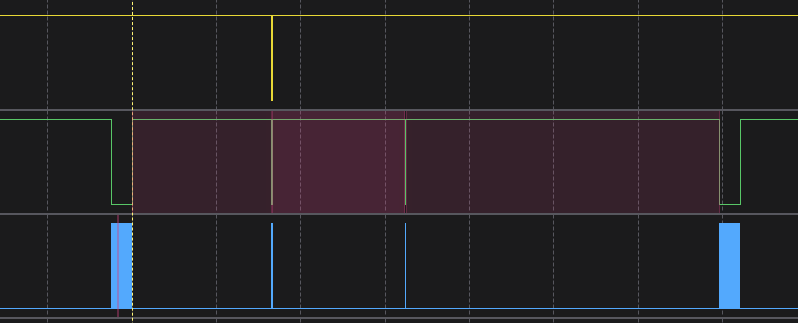
 .
.