Bus Pirate 6 LEDs won't turn off, device gets very hot

Hi all,

I’m using a Bus Pirate 6 (RP2350B) running:

Firmware main branch @ 322c452 (Oct 12 2026 09:03:22)

I was trying to disable the LED ring:

c

5 (LED effect)

1 (Disable)

x

The setting is saved correctly. My config file contains:

"led_effect": 0,

"led_color": "0x000000",

"led_brightness_divisor": 5

and the Bus Pirate reports:

Configuration file: Saved

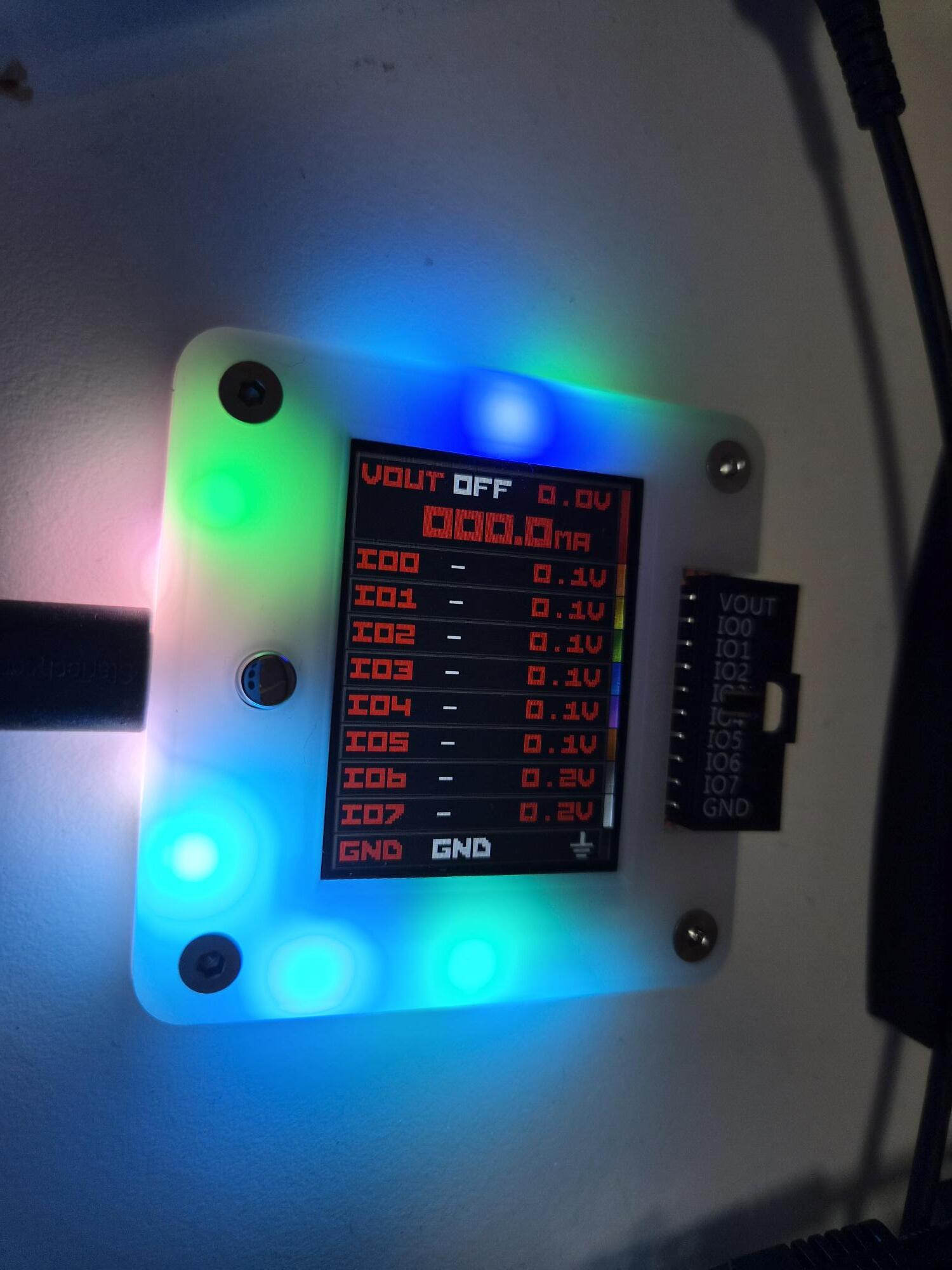
Originally the LEDs were animating (breathing/changing brightness and colour). After disabling the effect they appear to stop animating, but the LED ring remains fully illuminated and does not turn off.

The unit also becomes very warm, and at times feels hot enough that I am uncomfortable touching the enclosure. I initially suspected a configuration issue, but setting the colour to 0x000000 and updating to the latest firmware did not change the behaviour.

I also ran the self-test with nothing connected except USB and consistently get:

BIO4 FLOAT: 0.43V ERROR!

BIO5 FLOAT: 0.43V ERROR!

BIO6 FLOAT: 0.55V ERROR!

BIO7 FLOAT: 0.55V ERROR!

ERRORS: 2

FAIL! :(

All other tests pass.

Questions:

  1. Is it expected that LED Effect = Disable leaves the LED ring illuminated?
  2. Are the BIO4-BIO7 float test failures expected on Bus Pirate 6 hardware?
  3. Is the amount of heat generated by the LED ring normal, or could this indicate a hardware fault?

I’ve attached a photo showing the current LED behaviour.

Thanks!
2 Likes

That should definitely not happen. Thank you so much for reporting the issue. The firmware should limit the brightness to prevent the heat issue.

I need to grab a BP6 from the office and I will try to replicate the issue. If it isn’t a firmware problem we may need to send you new hardware.

1 Like

I’m sorry this took so long. I investigated the issue.

BP6 config
{
"terminal_language": 0,
"terminal_ansi_color": 1,
"terminal_ansi_statusbar": 1,
"display_format": 0,
"lcd_screensaver_active": 0,
"lcd_timeout": 0,
"led_effect": 0,
"led_color": "0xFF0000",
"led_brightness_divisor": 10,
"terminal_usb_enable": 1,
"terminal_uart_enable": 0,
"terminal_uart_number": 1,
"debug_uart_enable": 0,
"debug_uart_number": 0,
"disable_usb_serial_number": 1,
"bpio_debug_enable": 0
}

This is my current configuration.

The color configuration of 0x000000 is unusual, but it doesn’t impact the mode.

Matching bpconfig.bp
{
"terminal_language": 0,
"terminal_ansi_color": 1,
"terminal_ansi_statusbar": 1,
"display_format": 0,
"lcd_screensaver_active": 0,
"lcd_timeout": 0,
"led_effect": 0,
"led_color": "0x000000",
"led_brightness_divisor": 5,
"terminal_usb_enable": 1,
"terminal_uart_enable": 0,
"terminal_uart_number": 1,
"debug_uart_enable": 0,
"debug_uart_number": 0,
"disable_usb_serial_number": 1,
"bpio_debug_enable": 0
}

I manually edited my config to match yours and the LEDs are disabled.

IO pin float test failure: this is expected if the LEDs are on full power. The schottky diodes that protect the op-amps that feed the voltage monitor are super susceptible to heat. Voltage will float up even if the bare board is set atop a hot laptop. It is a very minuscule current though, so once the pin is held high or low it disappears.

  • Do the LEDs function properly when a mode is set? Such as gentle glow with a low brightness setting?

The really odd thing is these LEDs use a time based protocol, so something would have to tell them to go on full brightness. I suppose if the level shifter is faulty or not soldered well random noise might cause that, but it would most likely be random colors or nothing at all. The answer to the question above will hint towards an answer.

If you bought it from us (dirtypcbs) please open a support ticket on your order and we’ll send new hardware. If not, I’ll direct message you for details.

1 Like