Has anyone found a way to print out the Command Reference?
It is an excellent resource but it would be good just to have a something physical to flick through rather than having to scroll with a screen.
I have tried various techniques - trying to print the central frame from Chrome and trying my luck with the LLMs to do some magic but can’t get anything that I can turn into a booklet.
I appreciate that some the “pseudo-screenshot” animated code examples are not easily printable but most are static and are printable but generally the remainder of textual and tabular content comes up too large for printing.
I understand the documentation is created using some kind of markdown system - is that correct? Can that system generate a PDF version as well or is it strictly for HTML generation?
Thanks for your reply - Fom a quick search I see there is some ancient discussion regarding this topic in the Hugo discussion forums - I will a dig a bit deeper.
I’m concerned about this because we did a significant amount of work to put everything in a single place to make it printable, so if we didn’t actually achieve it…
I remember seeing an error very much like that. (I’m using Ubuntu, not Windows or WSL). Something about a module failing.
I am sorry, but I can’t remember what I did to fix it. I know it was a Google search that got me going, but can’t remember the specifics. It’s been a while
I spent a few minutes looking at my notes. The only thing I noted was to install “hugo extended version”.
I run Ubuntu on this machine (my daily driver). Checking apt, I see:
$ apt list --installed | grep hugo

WARNING: apt does not have a stable CLI interface. Use with caution in scripts.

hugo/now 0.147.9 amd64 [installed,local]
I pulled from upstream and verified it runs and serves the docs:
$ hugo serve -D
Watching for changes in /home/XXXXX/data/projects/BusPirate-docs-hugo/{archetypes,assets,content,data,layouts,static}
Watching for config changes in /home/XXXXX/data/projects/BusPirate-docs-hugo/hugo.toml, /home/XXXXX/data/projects/BusPirate-docs-hugo/go.mod
Start building sites …
hugo v0.147.9-29bdbde19c288d190e889294a862103c6efb70bf+extended+withdeploy linux/amd64 BuildDate=2025-06-23T08:22:20Z VendorInfo=gohugoio

WARN  calling IsSet with unsupported type "invalid" (<nil>) will always return false.

                  │  EN
──────────────────┼──────
 Pages            │  156
 Paginator pages  │    0
 Non-page files   │  345
 Static files     │ 1089
 Processed images │  121
 Aliases          │    0
 Cleaned          │    0

Built in 2512 ms
Environment: "development"
Serving pages from disk
Running in Fast Render Mode. For full rebuilds on change: hugo server --disableFastRender
Web Server is available at //localhost:1313/ (bind address 127.0.0.1)
Press Ctrl+C to stop
I remember I had an issue that sounded similar to yours, and I usually keep notes because if I solved something once, I figure it’ll pop up again later.
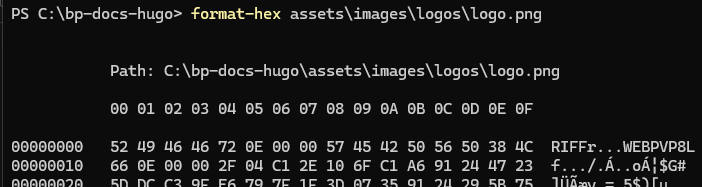
Sorry for the delay, a bit scattered this week. Based on the error, I believe it is because logo.png was secretly WEBP (first four bytes RIFF). I replaced it with a proper PNG and did a scan for any other assets with the same issue. I pushed the fix.
I originally set hugo up in a VM to try to help docs development separate. Possibly a Windows VM, but not sure. Anyway, I had issues and just installed Hugo and dependencies on the physical machine and it worked.
Linux would know the image was a webp even though extension is png; maybe that was it?
When I spec’d out the system 76, I got 24G of RAM and an extra terabyte of hard drive with the intention of installing seldom used software tools/suites in VMs to try to keep the base/physical machine more stable. I’ve done that for the most part, but have gotten lazier over the years since I purchased it.
Technically, RIFF @ 0x0000 is just the ID of the container type (or more accurately, the ID of the chunk).
It could be a gazillion file formats, such as many .WAV files, just by the RIFF. It’s the WEBPVP8 starting at 0x0008 that makes this a WebP image.
Decoding the file format...
RIFF is an ages-old specification Microsoft made to define the .wav file format. The indication of the format of the chunk is at offset 0x0008, which here clearly indicates the file is of type WEBP.
The next three bytes VP8 @ 0x000c are also required for a WebP container, and indicate the main WebP image chunk. The L @ 0x000Findicates this chunk uses lossless compression (would be ` aka 0x20 if lossy compression).
The container’s length field @ 0x0004 show a total file length of 0x0E72 (add offset + field == total file size of 0x0E7A).
The WebP image chunk @ offset 0x0010 gives an additional length of 0x0E66, and thus a next chunk (if any) would start at 0x0E7A.
That’s the file size, so this RIFF container only had a single chunk, which was the lossless WebP image format.