Failing to read flash memory (EN25S80 by Eon)

Hello everyone,

I have a Bus Pirate v5 Rev 10 that I have connected with a SOP-8 clip to a EN25S80 flash memory.
I’m trying to communicate with the chip but it’s not giving me anything. Not the device manufacturer ID, type ID nor capacity ID. I’ve tried via SPI setup according to the documentation, and I’ve attempted to use flashrom as well.

The device which the flash memory is on boots up normally so the flash memory itself should be fine. I am not sure why it’s not working. Any help is greatly appreciated.

I’ve tried SPI mode 0 and mode 3 (both supported by the flash memory), but no dice with either of them. I’ve tried the slowest possible speed as well. With pull up resistors it reads 0xFF everywhere, and without it reads 0x00.

Current settings are as follows:

Bus Pirate 5 REV10
Firmware main branch @ da21ba2 (Jan 14 2026 11:33:09)
RP2040 with 264KB RAM, 128Mbit FLASH
S/N: 28432F0B134063E4
Storage:   0.10GB (FAT16 File System)

Configuration file: Not Detected
Active binmode: SUMP logic analyzer
Available modes: HiZ 1WIRE UART HDUART I2C SPI 2WIRE 3WIRE DIO LED INFRARED JTAG
Active mode: SPI
SPI speed: 1 kHz
Data bits: 8
Clock polarity: Idle LOW
Clock phase: LEADING edge
Chip select: Active LOW (/CS)

Display format: Auto
Data format: 8 bits, MSB bitorder
Pull-up resistors: OFF
Power supply: OFF
Frequency generators: OFF

Here’s some output when I enable/disable pull up resistors and send the command to release from power down mode and try to read some bytes. (I also set IO2:HOLD# and IO3:WP# to HIGH).

SPI> A 2; A 3
IO2 set to OUTPUT: 1

IO3 set to OUTPUT: 1

SPI> [0xAB 0x00:3 r:10]

CS Enabled
TX: 0xAB 0x00 0x00 0x00 
RX: 0xFF 0xFF 0xFF 0xFF 0xFF 0xFF 0xFF 0xFF 
    0xFF 0xFF 
CS Disabled
SPI> p
Pull-up resistors: Disabled
SPI> [0xAB 0x00:3 r:10]

CS Enabled
TX: 0xAB 0x00 0x00 0x00 
RX: 0x00 0x00 0x00 0x00 0x00 0x00 0x00 0x00 
    0x00 0x00 
CS Disabled

I’ve also attempted to use flash probe:

SPI> flash probe

Initializing SPI flash...
Flash device manufacturer ID 0x00, type ID 0x00, capacity ID 0x00
Error: SFDP signature error. It must be 0x50444653 'SFDP'
Warning: Read SFDP parameter header information failed.
Warning: The chip does not support JEDEC SFDP.
Searching flash chip database for 0x00 0x00 0x00
Error: Flash device not found
Error: device not detected

As well as force reading exactly all the bytes available on the chip (per documentation 1,048,576 bytes), no dice there either.

SPI> flash read -o -b 1048576 -f test.bin
Initializing SPI flash...
Flash device manufacturer ID 0xFF, type ID 0xFF, capacity ID 0xFF
Error: SFDP signature error. It must be 0x50444653 'SFDP'
Warning: Read SFDP parameter header information failed.
Warning: The chip does not support JEDEC SFDP.
Searching flash chip database for 0xFF 0xFF 0xFF
Error: Flash device not found
Error: device not detected
Force read of unknown flash chip
Using command 0x03, reading 1048576 bytes
Dumping to test.bin...
[-------------------C]
Dump OK

And when I do hexdump on the file it’s empty.

Lastly I’ve tried to use binmode with flashrom (both specifying the chip with -c “EN25S80” and without specifying it) to no avail.

Anyone have any idea what I am doing wrong here? Any help is greatly appreciated.
1 Like

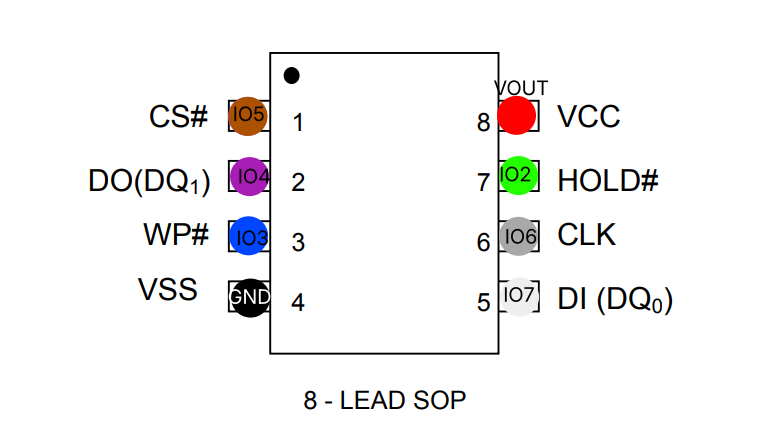
Here’s my connection schema for reference.

The document I’ve used is this data sheet EN25S80 Datasheet(PDF) - Eon Silicon Solution Inc..

2 Likes

Is the chip in circuit? I mean, is it still on the board? SPI generally doesn’t play well with multiple masters, the bus isn’t open collector like I2C.

I’ve usually had to remove them from the board to read them.

2 Likes

In one case, I was able to get the contents with a logic analyzer in circuit - the analyzer did protocol decoding and saved it all to a file. Then I wrote a python script to parse it and rebuild the contents based on bus reads.

2 Likes

1.65-1.95V

This immediately stands out to me. I believe flashrom just blasts out a 3.3v supply, which is way too much for this chip. I’d only work with it in terminal and be sure to W 1.8 to get a 1.8volt supply for the chip.

The other thing to check is that the WP and HOLD pins are being held high A 3; A 2 to disable those features. (or enable the pull-ups).

For the most basic test:

  • Enable power W 1.8
  • Disable WP and HOLD P or A 2; A 3
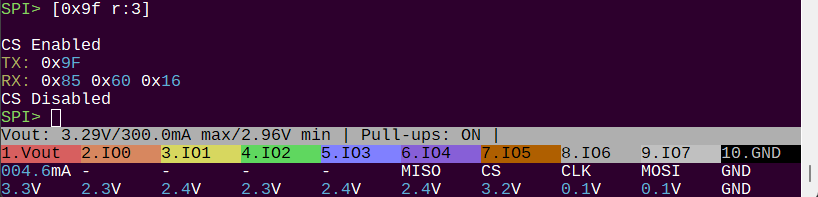
  • Read manufacturer ID: [ 0x9f r:3]

This chip supports 0x9f, but it does not support SFDP so it won’t be autodetected.

However, the flash command does have EON as a manufacturer, but the only part number supported is EN25Q32B. I can add this chip to the database I think, but we need to get the ID code out of it first.

1 Like

Oh, I missed this. Are you able to hold the rest of the circuit in reset while you try to read the flash?

What do the voltages on the Bus Pirate pins look like before you enable power to the Bus Pirate buffers? (W command).

The key to in circuit is figuring out how to hold it in reset so the other components don’t interfere. Even if the circuit is unpowered the power to the flash will probably activate it. You’ll usually need to find a reset pin for the main microcontroller and hold it in reset.

1 Like

Yes, the chip is still on the board (albeit the board naturally is powered off).

I see, I read that there might be some interference in play in some situations and perhaps it being on the circuit isn’t helping my case. However, it is not an option currently for me to remove it, so I’ll have to try my best. Thank you so much for your help and your suggestions, I’ll do the logic analyzer approach and see if I can sort it out that way. Thanks again.

1 Like

Ok, I’ll avoid flashrom just to be safe.

This is my first chip that I’m trying to communicate with using a Bus Pirate, so I’m really thankful for all the help guys, thank you.

I did precisely that; W 1.8, A 2; A 3 and tried with & without pull-ups, but thus far no dice.

This chip supports 0x9f, but it does not support SFDP so it won’t be autodetected.

Ahh, that explains it not being autodetected. The more you know!

Let’s see if I can manage to get the ID code out of it by using the approach @mbrugman suggested. I’ll report back when I’ve tested it out.

1 Like

The only caveat with the logic analyzer approach is speed. I see that chip is rated to 75 MHz, so you may need a fast analyzer. That’s where I usually run into trouble with that approach.

I don’t know what the product is, so I can’t say how much work was put into protecting IP or to meet some regulations (like 62443). It may be that there’s a header or pogo pin pads on board so the flash can be loaded at factory test or assembly. In that case, there’s probably the MCU reset line with the flash SPI lines.

As @ian said, be sure to keep the BP at 1.8 volts, but if you find a programming header or pins, there will probably be power there, so you won’t need BP powered up.

Keep us posted :slightly_smiling_face:

2 Likes

This is before I enable the power:

HiZ> m 6

Mode: SPI

Use previous settings?
 SPI speed: 1 kHz
 Data bits: 8 
 Clock polarity: Idle LOW 
 Clock phase: LEADING edge 
 Chip select: Active LOW (/CS) 

y/n, x to exit (Y) > Y

SPI> A 2; A 3;
IO2 set to OUTPUT: 1

IO3 set to OUTPUT: 1

SPI> V
Press any key to exit
1.Vout  2.IO0   3.IO1   4.IO2   5.IO3   6.IO4   7.IO5   8.IO6   9.IO7   10.GND
OFF	-	-	AUXH	AUXH	MISO	CS	CLK	MOSI	GND	
0.0V	0.0V	0.0V	0.0V	0.0V	0.0V	0.0V	0.0V	0.0V	GND

This is when I enable the power:

SPI> W 1.8
1.80V requested, closest value: 1.80V
300.0mA requested, closest value: 300.0mA
Undervoltage limit: 1.61V (10%)

Power supply:  Enabled
Vreg output: 1.7V, Vref/Vout pin: 1.7V, Current: 24.8mA

SPI> V
Press any key to exit
1.Vout  2.IO0   3.IO1   4.IO2   5.IO3   6.IO4   7.IO5   8.IO6   9.IO7   10.GND
24.8mA	-	-	AUXH	AUXH	MISO	CS	CLK	MOSI	GND	
1.7V	0.0V	0.0V	1.7V	1.8V	0.0V	1.7V	0.0V	0.0V	GND
  • VOUT 1.7V, IO2 1.7V, IO3 1.7V, IO4 (MISO) 0.0V, IO5 (CS) 1.7V, IO6 (CLK) 0.0V, IO7 (MOSI) 0.0V.

That’s without pull-up resistors.

“Even if the circuit is unpowered the power to the flash will probably activate it. You’ll usually need to find a reset pin for the main microcontroller and hold it in reset.”

To be perfectly honest, I’ve no idea where to begin with this, but I’ll do research and figure it out. Thank you!

2 Likes

You seem to be well on the way to cracking this. @mbrugman has a good point about the programming header. If you find something like that (through hole or pogo pin test points) then you night get lucky. Look for something with a weak pull high resistor like 10k ohms or so.

This is a deep cut, but I recently made this test firmware for observing spi while on a shared bus.

In spi mode the Z/z commands enable/disable the spi pins. So for example you could go into spi, run Z to disable the pins, then W to enable power. Now watch what happens with the pin voltages. If they twiddle a bit then the main CPU or whatever is accessing the flash.

Your bus pirate is already in SUMP mode, so you can use Sigrok/pulseview (sorry, on mobile, but check the docs) to do logic analysis while in Z (spi disconnect) to get a look at what’s happening on the pins.

Happy to help. If we can come up with a toolkit for these situations everyone is better off.

1 Like

Oh wow, look at the 24 ma current consumption after you power up. That is a lot of other stuff sucking power. For flash it should be negligible, baseline almost (2to 5 ma, just the tolerance in the current sense resistor and offset in a few opamps, plus front end buffer)

1 Like

There is one additional possibility that can cause issues, that is rarely mentioned but possible for in-circuit probing: Conformal Coating.


Conformal Coating

Note: Oxidization or other corrosion has same effects, and same tests / fixes often work.

Conformal coating is more common in appliances, such as a fridge, but could be on any PCB. For example, the coating might be used to seal (most of … excluding connectors) a finished board, to reduce humidity effects, oxidization, corrosion, etc. These conformal coatings could interfere with getting a probe to make contact.

Sometimes the coatings are UV reactive, to simplify verification of coverage. If you have a UV light, check if the board glows under it. If not, it’s not definitive (board still might have a coating). If it does glow, that’s a strong indicator to try …

  1. Do you have a connector (not trace / test point) with known ground?
  2. Do you easily get continuity from that ground connector to the flash chip’s ground pin?
  3. If not, this is another indicator of some coating or corrosion impacting connectivity.

Workaround testing
  • Get a new razor blade, such as used in box cutters (sharpness is important)
  • Find the ground pin on the flash chip
  • Holding blade perpendicular to both the scraping motion and the surface of the flash chip’s ground pin.
  • Gently scrape until the pin is shiny or you see the effect of scraping on the flash chip’s ground pin.
  • Check continuity between the connector’s ground and the flash pin’s ground.

If this is now easier to establish, repeat scraping procedure on the other pins.


In addition, you could disconnect the flash chip’s power pin. Sometimes, power provided there back-powers the system, which interferes with your attempts to dump the chip. (24mA … yes, this could help!)

If that’s not possible, look to see if you can find the reset pin for the MCU, and hold the MCU in reset when you’re doing in-circuit probing. That way, even if power is provided to the MCU, it won’t start up.

1 Like

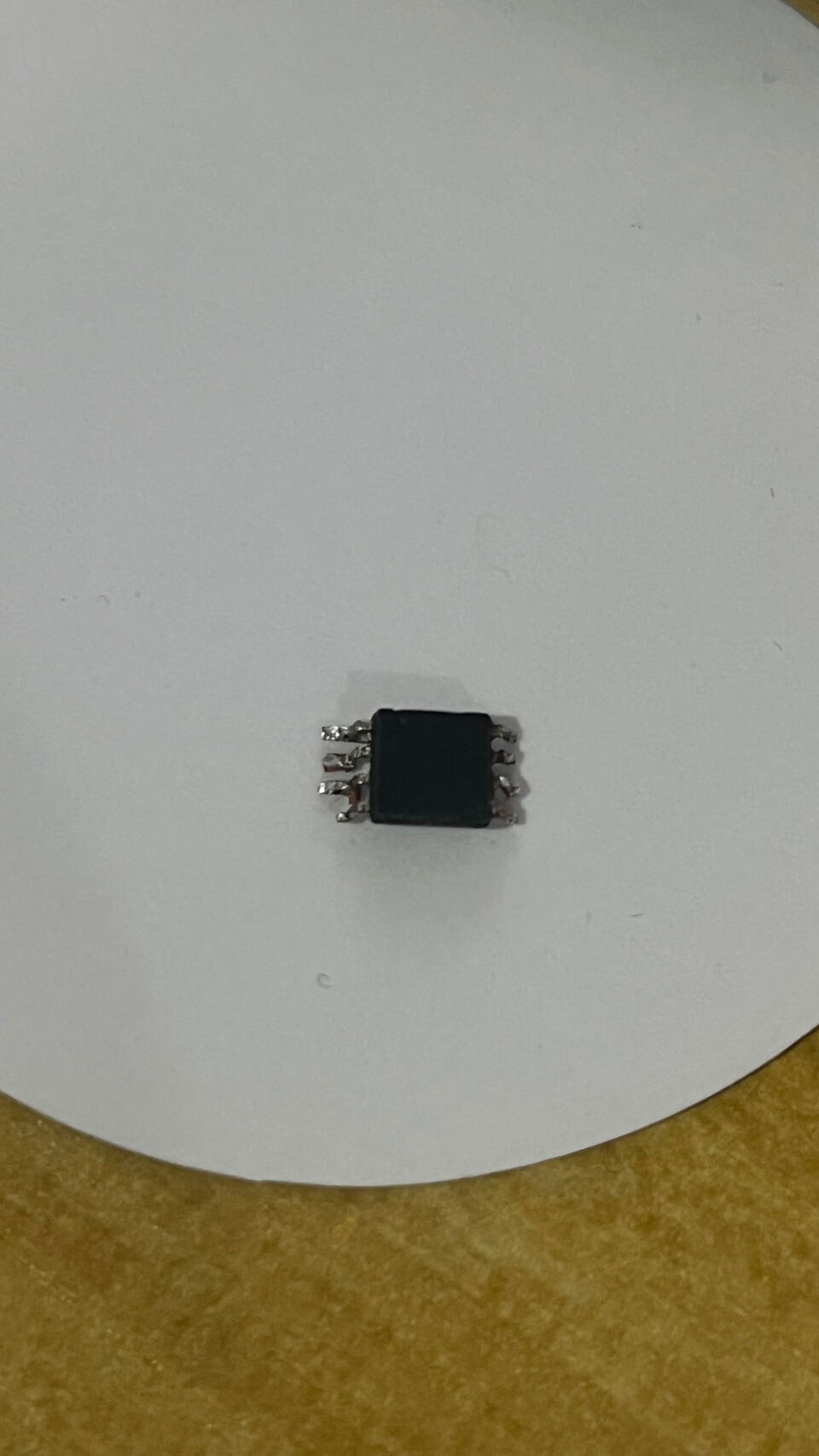
Update: I have desoldered it despite my initial reservations. I’ll make an update when I’ve attempted to communicate with the chip.

3 Likes

The heavy duty approach! Congratulations!

2 Likes

I accidentally broke off one of the legs, but I still believe I can connect to it as there’s still some metal exposed where the leg was.

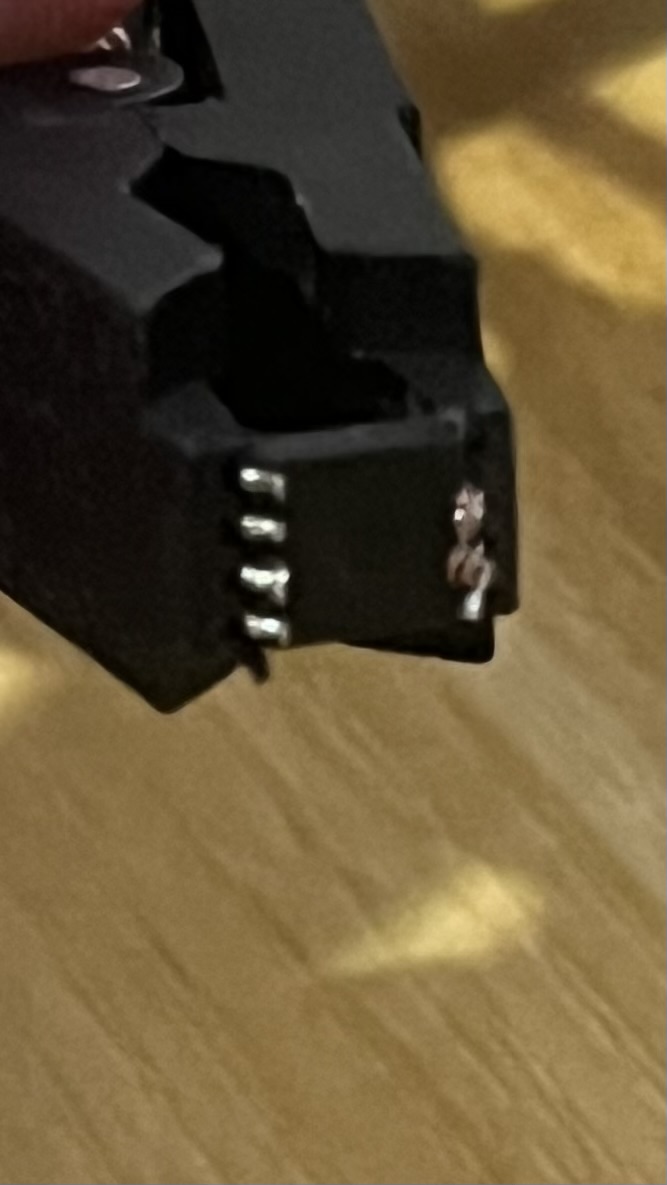
I think I’ve managed to clamp it correctly with my SOP-8 clamp, but I’m still getting nothing.

Mode: SPI

Use previous settings?
 SPI speed: 1 kHz
 Data bits: 8 
 Clock polarity: Idle LOW 
 Clock phase: LEADING edge 
 Chip select: Active LOW (/CS) 

y/n, x to exit (Y) > Y

SPI> A 2; A 3
IO2 set to OUTPUT: 1

IO3 set to OUTPUT: 1

SPI> [0xab]

CS Enabled
TX: 0xAB 
CS Disabled
SPI> [0x9f r:3]

CS Enabled
TX: 0x9F 
RX: 0x00 0x00 0x00 
CS Disabled
SPI> A 2; A 3
IO2 set to OUTPUT: 1

IO3 set to OUTPUT: 1

SPI> [0xab]

CS Enabled
TX: 0xAB 
CS Disabled
SPI> P
Pull-up resistors: Enabled (10K ohms @ 1.8V)

SPI> [0xab]

CS Enabled
TX: 0xAB 
CS Disabled
SPI> [0x9f r:3]

CS Enabled
TX: 0x9F 
RX: 0xFF 0xFF 0xFF 
CS Disabled
SPI> V
Press any key to exit
1.Vout  2.IO0   3.IO1   4.IO2   5.IO3   6.IO4   7.IO5   8.IO6   9.IO7   10.GND
2.1mA	-	-	AUXH	AUXH	MISO	CS	CLK	MOSI	GND	
1.8V	1.7V	1.7V	1.8V	1.8V	1.7V	1.8V	0.0V	0.0V	GND

SPI> p
Pull-up resistors: Disabled

SPI> V
Press any key to exit
1.Vout  2.IO0   3.IO1   4.IO2   5.IO3   6.IO4   7.IO5   8.IO6   9.IO7   10.GND
2.1mA	-	-	AUXH	AUXH	MISO	CS	CLK	MOSI	GND	
1.8V	1.7V	1.7V	1.8V	1.8V	1.7V	1.8V	0.0V	0.0V	GND

However, I see this message when I disable the power, so perhaps something is off with the connection:

SPI> w
Power supply: Disabled

SPI> 

Error: Potential short circuit, power supply disabled

Any ideas folks?

1 Like

Difficult to get a good photo of how I am attempting this, but here’s what it looks like.

1 Like

This is my fault, there is still a race condition somewhere in the recently updated PSU code. It is harmless, but annoying.

 Chip select: Active LOW (/CS) 

y/n, x to exit (Y) > Y

SPI> A 2; A 3
IO2 set to OUTPUT: 1

Is this output abbreviated? I see that you have 1.8volts available later in the output, but I don’t see where it is enabled. It is a bit odd that you still see 1.7V 1.7V on IO0/1/4 after disabling the pull-ups. However pull-up aren’t needed for SPI so this shouldn’t impact reading the chip. It could indicate poor connection? Have you run teh Bus Pirate self test ~?

I suspect the broken pin and/or SOP clip may be giving you issues.

Things to check:

  • Your Bus Pirate is getting real world data, which we can see from the change of 0x00 to 0xff when pull-ups enabled. Run the self test (~) to be sure the hardware is in good shape.
  • Ensure it is the ‘S’ part with the low voltage range (what voltage did the original board give it?)
  • There do not seem to be alternate packages
  • If a pin is broken, make sure you’re actually making contact. Perhaps solder a bit of wire or solder to the lead. Or better solder the lead directly to the clip.
  • Are the signals you expect making it through the clip to the chip? Try twiddling IO2 and IO3 and verify the value on the clip leads with a multimeter. Also measure between the power and ground pins.
  • The connections in your diagram above are correct. Double check that the chip is connected as you intended.

Getting the ID from flash chips should be dead simple. As long as the chip has the right power and the SPI pins are well connected it should spit out the 3 byte ID.

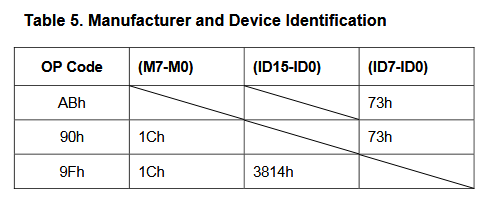
According to the datasheet, we’re looking for 0x1c 0x38 0x14.

Be sure to disconnect everything before running the self test.