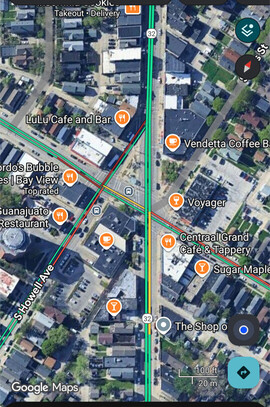
I think it is anonymous enough. It’s at a recognizable intersection in one of the most hipster-ish neighborhoods in Milwaukee 
2 Likes
This where openstreet maps puts it, which is pretty much where I was sitting in Collectivo - needed to get by a window on the second floor 
1 Like
Wow then the coordinates are incredibly accurate!
1 Like
Yeah, I was very surprised at that, too!
1 Like
I was going to set up in the beer garden in that park to the south (Humboldt park), but it was rainy and all the tables were wet
1 Like
Ok, I’ve got about 2/3 of the device demo done:
- Intro with image of BP connected to GPS (done)
- “See it in action” screencast (done)
- Config explanation, with snippets (done)
- Command example snippet (done)
- Explanation of what the NMEA sentences in the final snippet mean (todo)
A pretty good day
I should finish tomorrow or Friday, depending on weather.
4 Likes
Yeah it seems like things are super messy at U-blox right now. I love their hardware but I would have a very hard time trusting them in a business relationship. I hope they come out on the other side of whatever is going on unscathed.
Another option for corrections via a wireless link is to just be cool with sharing it. Ive come across documentation for a few publicly broadcast correction streams, though everything seems to be pushing toward IP delivery.
I’ve played around with RTCM over LoRa (not Meshtastic), and over 802.11ah HaLow. Most modern RTK modules can be configured to have RTCM corrections pumped in via one of their UARTS.
Nate at Sparkfun has done some awesome GNSS related guides the last few years:
Currently the best RTK bang for your buck, imo, is the Quectel LG290P. Lots of options to buy it on AliExpress and also via Sparkfun. Another module worth checking out is the Quectel LC29H(BA) (the last part of the model number here is critical, lots of sub modules, not all have RTK).
3 Likes
Nice!
I pushed a very rudimentary openstreetmap shortcode.
{{< openstreetmap
x="52.37282526325461"
y="4.8933590948581696"
bbox="4.891187846660615,52.37213912674638,4.895530343055726,52.373511389103804" >}}
Usage is something like this.
- Marker X/Y coordinates
- Bounding box coordinates
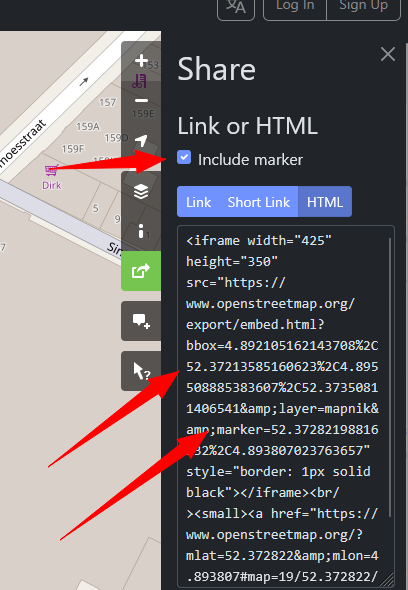
As a reference for anyone not working with raw GPS data (such as present me, and future me), the coordinates can be pulled from the Openstreetmap share/embedded URL. Note that %2C needs to be replaced with , because I couldn’t figure out how to stop Hugo from escaping the % a second time.
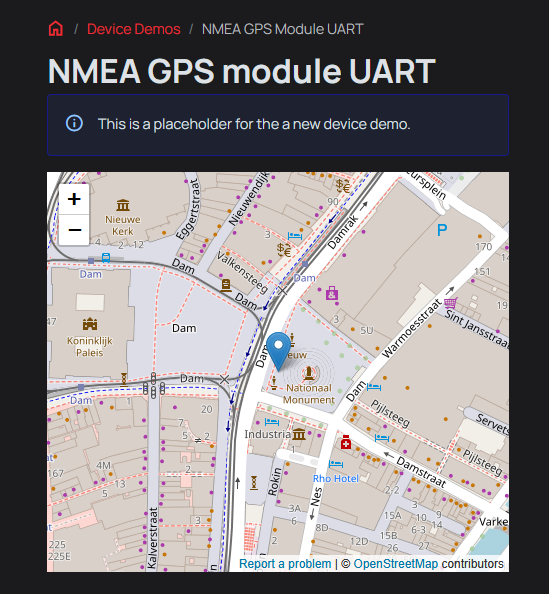
The result should look something like this.
1 Like
This does look like a premium module. I’ll pick one up as well.
Nate’s articles on GPS are great. Run into them several times in the last few days and they always break down the concept very simply before diving in. GPS world has so much jargon it is intimidating to a beginner like me.
1 Like
Do you think the map should be at the start of the demo, like where the image of the device being demo’d typically does? I kind of like that idea; like a preview.
1 Like
Sure, that sounds great. Perhaps one instance somewhere could be a screenshot, so there is still something shown if the docs are viewed without an active internet connection.
1 Like
@ian - I submitted the PR for the docs. Please check it out - I’m sure there are some spelling/typos in there somewhere
(I also had to resolve the conflict with the last demo change you made to show the openstreetmaps usage; should be good)
3 Likes
Baah, I’m sorry, I should have pushed a test page. Didn’t mean to poke a stick into your tire spokes.
Thank you so much. I will give it a proof and add a resource list compiled from all the helpful posts in this thread.
2 Likes
No worries
Words words words
2 Likes
Thanks again @mbrugman! Excellent demo and overview of GPS/NMEA. You even added a cast and a snip! It’s so nice to have that place holder page filled.
The tutorial is live. I made some minor formatting changes and added sections on using the {} to open/close UART and the bridge command (with external software). Please let me know if you’d like any changes there.
One thing I didn’t realize, because I’d never successfully gotten a fix until recently, is how few of the NMEA sentences are decoded and how little info is exposed. gps was one of the first experimental commands, and I used the first library I came across. I’ll see what else is out there that we could substitute.
1 Like
You’re welcome! Your additions are perfect, and add great context. I had planned to used bridge to show raw output, but forgot it along the way.
I was looking at this for a parser: GitHub - kosma/minmea: a lightweight GPS NMEA 0183 parser library in pure C but I haven’t looked to deeply at it yet.
I got what I needed out of writing the demo - I learned the very basics of NMEA and how I’ll use it in my upcoming project.
1 Like
Its funny cuz this link is repo from one guy Kosma from our local hackerspace. He tought me alot!
2 Likes
Even funnier that is the library we use in the firmware
I see there is a recent update that fixes some sentence matching. I integrated the update, will test and push now.
1 Like
Haha, I didn’t realize it was the same library! I need to spend more time reading the docs!! 
1 Like
| Model | LG290P (03) | ATGM336H-F8N-76 | NEO-M9N | ZED-F9P |
|---|---|---|---|---|
| GPS | L1 C/A, L1C*, L5, L2C | L1, L5 | L1C/A | L1C/A, L2C |
| GLONASS | L1, L2 | L1 | L1OF | L1OF, L2OF |
| Galileo | E1, E5a, E5b, E6 | E1、E5a | E1-B/C | E1-B/C, E5b |
| BDS | B1I, B1C, B2a, B2b, B2I, B3I | B1I, B1C, B2a | B1I | B1I, B2I |
| IRNSS | L5 | L5 | NO ? | NO |
| QZSS | L1 C/A, L1C*, L5, L2C | L1, L5 | YES | YES |
| Sim. Networks | 4 | “Multiple” | 4 | 4 |
| Sat. Tracking | 1040 | 176 | 92 | ? |
| SBAS | L1 (WASS/EGNOS/BDSBAS/MSAS/GAGAN/KASS/ASECNA/SouthPAN/ SDCM) | L1 (?) | L1 ? (EGNOS, GAGAN, MSAS and WAAS) | L1 (WAAS, EGNOS, L1Sb (QZSS SBAS), GAGAN) |
| RTK | YES | NO | NO | YES |
| Update | 20Hz | 20Hz | 25Hz | 10-25Hz |
| Cost | $42 (297) | $6.50 (46.56) | $10 (73.5) | $78 (556) |
Tried to put the verifiable information about these GNSS modules into some kind of comparison table. It is by no means completely accurate. QZSS especially is hard to differentiate because the datasheets don’t usually separate the QZSS GNSS tracking satellites and SBAS augmentation satellites.
The little ATGM module seems to punch above it’s weight, and the LS290P really is a great bargain. Prices are for breakout boards I purchased in USD and (RMB).
If you’ve come across this on a random search - note that “more of everything” isn’t always better. Outside Japan and Australia QZSS isn’t available. IRNSS is only available in and near India. SBAS is also regional (EGNOS in EU, WAAS in US, etc).
1 Like