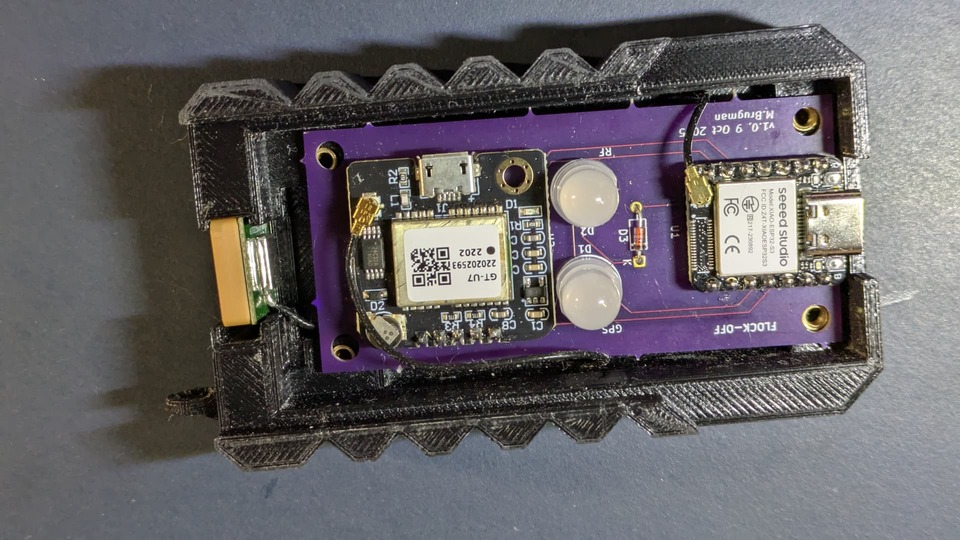
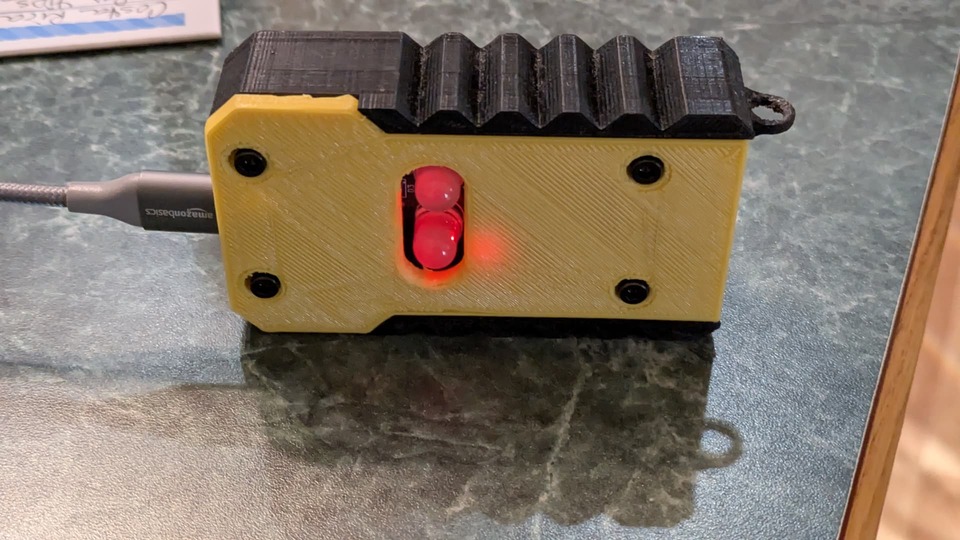
Just wanted to share my latest non-Bus Pirate related project - a surveillance sniffer. Nothing really dramatically new, but just fun. There’s an ESP32S3 for WiFi and BTLE sniffing and a GPS module for location. Just finished the first pass at the 3D printed case and assembly - I feel like it’s an actual product, haha.
Currently using it for wardriving. Once I have identifiers for surveillance things set, it’ll do flashy lights when those things are nearby. Plan on looking for WiFi names, MAC addresses, BTLE MAC addresses, 16-bit BTLE service UUIDs and anything else.
I did see his stuff. The bad thing is that he didn’t declare a license in any of his repos. According to the GitHub T&C’s everything is then “all rights reserved” and a person can’t legally do anything with it.
I raised an issue about it, but it was ignored and I finally closed it myself
Thanks! I spent a lot more time than I normally would. Doesn’t look as professional up close, haha.
I think the developer is more interested in selling the hardware on their Tindie shop. That’s perfectly fine; there’s room for everyone in the hobbyist tent
A 3D printed case, especially with the design details you added, is always such a nice touch. I think you get used to the 3D printed aesthetic too. At first I found it a bit weird, but now it seems totally normal.
I looked at some of the projects in detail. For instance, on
it says on the bottom of the page “Open source project. Modifications welcome.”
It says the same on the ouispy-detector project. Some of the other ones vary - perhaps because parts/all were contributed to the overall project by others.
For the record, I bought a set of PCB’s from him, but the hardware is trivial to built on a proto-board, so I built a second one.
The PCBs are kind of funky and cool - I think he did a nice job on them, but yeah; the hardware is pretty trival.
The problem is that he can put that in text, but without a license a person can’t (legally) do much with it. Github is pretty direct about it:
You’re under no obligation to choose a license. However, without a license, the default copyright laws apply, meaning that you retain all rights to your source code and no one may reproduce, distribute, or create derivative works from your work.
Does that mean that even though the author welcomes modifications, another user can’t legally fork it, make changes, then send a PR because that would be a “derivative work”? IANAL but dang; it’s easy enough to just pick a license and declare it.
It’s kind of funky - most people putting up projects they want to share don’t think about licensing, but it’s pretty important. I think Github could do a better job. If no license means “all rights reserved” then maybe disable the fork and clone functionality on projects without a license declared
Would also make sense to disable PRs from anyone other than the owner… since having non-owner PRs can make it difficult to later add a license. e.g., Would it require all “non-trivial” contributors to agree to providing their PR under license? What even is “non-trivial”? I’ve seen it done a couple times, but … not a common thing.
Question for those with good/deep 802.11 WiFi packet knowledge. I was wardriving around with the device, and I saw this at one location. These packets are of type data and subtype 0b1111 (Null data CF-END & CF-ACK).
The 802.11 source addresses are interesting in their sequencing. I think the destination address is an AP, but it never broadcast a beacon or any other subtype of management packets. Also interesting in that this is the only time I’ve seen anything on channels 153 or 157.
The location was at 42.90746, -87.86475 (handy having GPS built in to the device ). Not much special there - it’s a fairly busy corner with a strip mall and a branch of a local credit union.
Anyway, I’m learning more about BT and WiFi than I thought I’d ever need, but it’s good clean fun! Thanks for the “off topic” category.
subtype
sourceAddr
destAddr
rssi
channel
ND CF-ACK + CF-Poll
00:a0:84:8b:d6:9c
c5:3c:b0:e2:69:2d
-84
157
ND CF-ACK + CF-Poll
10:a0:84:8b:d6:9c
c5:3c:b0:e2:69:2d
-84
157
ND CF-ACK + CF-Poll
20:a0:84:8b:d6:9c
c5:3c:b0:e2:69:2d
-89
153
ND CF-ACK + CF-Poll
30:a0:84:8b:d6:9c
c5:3c:b0:e2:69:2d
-86
157
ND CF-ACK + CF-Poll
40:a0:84:8b:d6:9c
c5:3c:b0:e2:69:2d
-81
157
ND CF-ACK + CF-Poll
50:a0:84:8b:d6:9c
c5:3c:b0:e2:69:2d
-88
153
ND CF-ACK + CF-Poll
60:a0:84:8b:d6:9c
c5:3c:b0:e2:69:2d
-83
157
ND CF-ACK + CF-Poll
70:a0:84:8b:d6:9c
c5:3c:b0:e2:69:2d
-89
157
ND CF-ACK + CF-Poll
80:a0:84:8b:d6:9c
c5:3c:b0:e2:69:2d
-88
157
ND CF-ACK + CF-Poll
90:a0:84:8b:d6:9c
c5:3c:b0:e2:69:2d
-88
157
ND CF-ACK + CF-Poll
a0:a0:84:8b:d6:9c
c5:3c:b0:e2:69:2d
-86
157
ND CF-ACK + CF-Poll
b0:a0:84:8b:d6:9c
c5:3c:b0:e2:69:2d
-89
153
ND CF-ACK + CF-Poll
c0:a0:84:8b:d6:9c
c5:3c:b0:e2:69:2d
-83
157
ND CF-ACK + CF-Poll
d0:a0:84:8b:d6:9c
c5:3c:b0:e2:69:2d
-88
153
ND CF-ACK + CF-Poll
e0:a0:84:8b:d6:9c
c5:3c:b0:e2:69:2d
-90
153
ND CF-ACK + CF-Poll
f0:a0:84:8b:d6:9c
c5:3c:b0:e2:69:2d
-86
157
Edit - what’s weird to me is that the device says it captured data and management packets on channels 44, 48, 153, 157, and 161, but the EPS32 I’m using is supposed only be 2.4GHz, and I think those channels are in the 5GHz band.
The RSSI is very low. With -80 the chance is pretty high you are only in range for one party. In general I don’t start any analysis under -50.
Interesting is the first block of the source. That increases by 10, but the destination is the same.
Why should any WiFi device change the MAC in a pattern? It’s maybe a penetration test against a specific AP?
Or there are multiple sensors, that want to report to one central point, but more than 10 sensors in the same distance? And they would change the last block of the MAC, not the first with the Vendors ID.
If I match your package to the documentation correctly, it seems to be QOS requests to the AP. So nearby a mall. Some VOIP phones at a charging station?
Yes - I was playing with the settings in my code. I have a setting for minimum RSSI, but I was verifying that it worked as expected. This particular scan it was “wide open”. I’ll have to go back to that area and drive around to get higher signal strength and maybe catch the AP.
Yes - exactly what caught my eye. I’m guessing it was 16 devices instead of one changing MAC, but I’ll have to go back and try slightly different locations to see if I can get better signal and results. That sequence of source addresses is really interesting. I’d honestly be surprised if I just happened to catch a pentest or even an attack.
I’ve seen enough reference material to be able to correctly parse out the data from various packet types, I just don’t necessarily understand what some of these packets actually do or what they represent. I’ll look at the link you supplied for more info - thanks for that!
I don’t think there’s a charging station; I’d be surprised to see VOIP phones. When I say “strip mall”, I mean a Dollar General, a liquor store, an auto repair/parts shop, and a coin laundry.
The way the device works is to capture and store locally in .json files, which I then export and use to populate database tables. From there, I can use SQL queries to poke around the results. That’s where I found this particular set of packets.
I need to admit, I read your table and the linked page wrong… I thought this evening about this topic, as I walked with my dog.
The QOS packages have the 1111 as data frame. But your table clearly indicates these are management frame packages.
As the base is too far away. You see only the final END ACK of the client.
My dog asked me to take a look into the GitHub (yes, she is very intelligent).
I have the feeling the MAC is saved reversed. So I took MAC, tried the first 3 blocks, the second 3 blocks, I inversed them, I converted to binary, reversed it and converted it back … nothing, no valid vendor MAC from the wireshark OUI database.
Good point. When I first put it together, I verified correct byte order for the MAC addresses, comparing results at home to what my DHCP server logged, for example. I’m certain the byte order is correct, but your dog is very smart.
The packets are data frames, not management, the type field is 10.
I went back out to the location to try to narrow down where those weird stations are. I wasn’t able to get much closer - I think I have to be on foot to really get near, and I don’t want to draw that much attention, lol.
The weird frames are definitely data frames. The type field is 0x10 and subtype is 0b1111 - see 802.11 frame types - Wikipedia
The post-processing python script and database loader includes a recent copy of the full OUI to vendor database. Joining that table to the table of data frames shows MAC address is correct (a subset of results, but is reasonable based on where I was and what I could see).
Results of query for data frames (by subtype) 'left joined' with OUI lookup table:
Station MAC
Dest MAC
CH
Data Subtype
Survey
OUI Mfg
4c:ab:f8:ec:75:76
01:80:c2:00:00:00
11
Data
9
ASKEY COMPUTER CORP
6c:4b:b4:4c:00:a4
33:33:ff:88:09:04
9
Data
1
HUMAX Co., Ltd.
94:91:7f:ec:5c:3d
01:00:5e:00:00:16
11
Data
8
ASKEY COMPUTER CORP
c8:d7:19:df:62:d3
01:00:5e:7f:ff:fa
1
Data
5
Cisco-Linksys, LLC
d0:21:f9:4f:a7:31
01:00:5e:00:00:fb
10
Data
9
Ubiquiti Inc
24:0a:c4:50:5d:58
00:30:44:48:b8:14
11
ND (null no data)
8
Espressif Inc.
34:5f:45:cf:50:b8
14:7d:05:67:6e:ef
11
ND (null no data)
1
Espressif Inc.
60:a0:84:8b:d6:9c
c5:3c:b0:e2:69:2d
165
ND CF-ACK + CF-Poll
7
80:a0:84:8b:d6:9c
c5:3c:b0:e2:69:2d
161
ND CF-ACK + CF-Poll
7
00:f6:20:79:f8:d2
14:59:c0:c9:45:74
8
ND QoS
1
Google, Inc.
50:14:79:a3:74:95
74:37:5f:56:84:ab
12
ND QoS
1
iRobot Corporation
64:9a:63:eb:e3:6f
60:32:b1:a7:4f:02
10
ND QoS
8
Ring LLC
80:cc:9c:b1:27:7b
44:00:49:40:65:cb
4
ND QoS
7
NETGEAR
90:48:6c:e1:c2:c7
60:32:b1:a7:4f:02
10
ND QoS
8
Ring LLC
e8:38:a0:43:08:e5
3c:f0:83:e7:9b:c4
3
ND QoS
10
Vizio, Inc
08:12:a5:bc:30:2a
78:6a:1f:6c:c0:04
6
QoS Data
1
Amazon Technologies Inc.
18:ef:3a:c7:a7:ab
a0:55:1f:09:91:41
7
QoS Data
4
Sichuan AI-Link Technology Co., Ltd.
2c:64:1f:1c:66:8e
f8:5b:3b:af:4a:f4
1
QoS Data
9
Vizio, Inc
2c:aa:8e:6b:30:d8
4c:ab:f8:7c:cb:a8
1
QoS Data
4
Wyze Labs Inc
38:83:9a:9f:ee:96
34:19:4d:bf:fc:94
8
QoS Data
1
SHENZHEN RF-LINK TECHNOLOGY CO.,LTD.
50:14:79:a3:74:95
74:37:5f:56:84:ab
11
QoS Data
5
iRobot Corporation
I'm even more confident about MAC given a query that joins management frame table with data frame table to show association (left joined with OUI lookup table):
AP SSID
AP BSSID
station MAC
station data subtype
CH
survey
station vendor
FBIISWATCHINGYOU
56:07:7d:f4:b9:ae
aa:29:48:03:58:1c
ND QoS
10
10
Lotus
60:32:b1:a7:4f:02
64:9a:63:eb:e3:6f
ND QoS
10
8
Ring LLC
Lotus
60:32:b1:a7:4f:02
90:48:6c:e1:c2:c7
ND QoS
10
8
Ring LLC
NETGEAR25
14:59:c0:c9:45:74
00:f6:20:79:f8:d2
ND QoS
8
1
Google, Inc.
NETGEAR25
14:59:c0:c9:45:74
8a:b0:23:56:a5:7d
ND QoS
9
10
SpectrumSetup-913B
a0:55:1f:09:91:41
18:ef:3a:c7:a7:ab
QoS Data
7
4
Sichuan AI-Link Technology Co., Ltd.
SpectrumSetup-913B
a0:55:1f:09:91:41
18:ef:3a:c7:a7:ab
QoS Data
5
5
Sichuan AI-Link Technology Co., Ltd.
SpectrumSetup-913B
a0:55:1f:09:91:41
18:ef:3a:c7:a7:ab
QoS Data
6
7
Sichuan AI-Link Technology Co., Ltd.
SpectrumSetup-D01C
2c:67:be:31:d0:20
ba:3e:54:15:25:b3
ND (null no data)
10
4
SpectrumSetup-ED
14:7d:05:67:6e:ef
34:5f:45:cf:50:b8
ND (null no data)
11
1
Espressif Inc.
SpectrumSetup-F6
f8:5b:3b:af:4a:f4
2c:64:1f:1c:66:8e
QoS Data
1
9
Vizio, Inc
TMOBILE-6C38
18:60:41:49:6c:3a
40:2a:34:84:70:56
QoS Data
3
5
TMOBILE-6C38
3c:f0:83:e7:9b:c4
e8:38:a0:43:08:e5
ND QoS
3
10
Vizio, Inc
TT-CRD2063
00:30:44:48:b8:14
24:0a:c4:50:5d:58
ND (null no data)
11
8
Espressif Inc.
Tonrol7
78:6a:1f:6c:c0:04
08:12:a5:bc:30:2a
QoS Data
6
1
Amazon Technologies Inc.
Verizon_M73QVW
4c:ab:f8:7c:cb:a8
2c:aa:8e:6b:30:d8
QoS Data
1
4
Wyze Labs Inc
YKLhome
c4:41:1e:ea:74:1e
44:87:63:b3:ff:d0
ND (null no data)
10
7
FN-LINK TECHNOLOGY Ltd.
pussy palace
74:37:5f:56:84:ab
50:14:79:a3:74:95
ND QoS
12
1
iRobot Corporation
pussy palace
74:37:5f:56:84:ab
3c:31:74:2a:56:15
ND (null no data)
11
5
Google, Inc.
pussy palace
74:37:5f:56:84:ab
50:14:79:a3:74:95
QoS Data
11
5
iRobot Corporation
sticky-fingers
34:19:4d:bf:fc:94
38:83:9a:9f:ee:96
QoS Data
8
1
SHENZHEN RF-LINK TECHNOLOGY CO.,LTD.
The funky stations aren’t in the second table because the destination they are talking to isn’t sending out any management frames (my logic assumes that an AP will send management frames at least once in a while, beacons, probe responses, etc.)
Anyway, it looks like I’ll have to try to inconspicuously walk around the area trying to figure out the mystery of the CF-ACK + CF-POLL devices with the crazy incrementing MAC addresses


 ). Not much special there - it’s a fairly busy corner with a strip mall and a branch of a local credit union.