I’ve a Bus Pirate and it’s super useful. Right now, I’m using it to flash I2C memory. I’ve written a script that writes the correct content using the I2C mode.
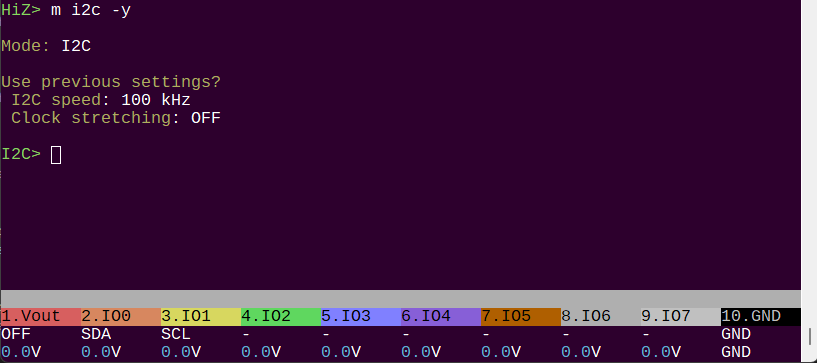
What I’d like now is to automate everything. Meaning, powering Bus Pirate, pushing button, that’s it. No user interface. The issue I have is that I cannot find a way to script the “m i2c” command because it always show a user prompt for I2C parameters (keep old settings ? clock ? strech ?).
@Ian – This is an example of the need for fully parameterized commands (e.g., supported way to avoid prompts, and ensure backwards-compatibility with older scripts).
Using python to parse serial output might work, but I believe it will be fragile … i.e., you’ll be matching the text output, which may change between firmware versions.
If being tethered to a PC is acceptable, then the BPIO2 interface is scriptable, and I’ve used it to erase / read /write SPI flash. You might want to see what’s available for I2C. The BPIO2 interface is usable from many different languages: Python, .NET, GO, others … so it might work for you if tethered use is OK.
I don’t know if there’s a current solution (mostly as I’ve not tried it, and don’t know the scripting side well) that will work stand-alone (without a PC).
Let me think about how to bypass that. If you’re ok with just using the defaults or the the last saved settings I can give you that right away.
I can also add single character - config options for the mode command, however it will be really ugly for some modes.
In terms of fully parameterized options, yeah, it’s definitely something to aim for. We’ll need to rip out and replace most of the console and that is going to be a long term project.
Sounds like an issue that was root-caused, and needs to be tracked to ensure it gets fixed. I’d dive in, but real life events are limiting my hobby time for a while.
Is there already a github issue on this?
@Ian – If not, would you like me to open one with a summary?
@rominos2 I added a hack to I2C only (awaiting full system wide solution) that should use saved parameters if you add the -y flag to the m command. I have not tested it because I’m swapping over my debug setup for tomorrow, but it should work. An autobuild should drop shortly.
@henrygab I have identified the source of the bug on BP6 with BPIO, I am attempting a fix tomorrow. At the moment it seems to be a BP6 only issue.
Can confirm that this does work. I’m tempted to add it everywhere, but probably a better use to add long flags somehow to make modes fully configurable from the command line.
However, I’ve noticed something. We plugging the BP, screen lits up ok, but the button script does not trigger on button press. I need to connect to the serial interface (just connect) and then the button script trigger on press.
I guess this is something caused by the fact that the scripting emulated commands inputs and that it does not work when no console is opnened ?