USB-C PD Plank?

I’m concerned … having the BP probe and guess unless it already knows what board is expected … not recommended.

Specifically, there is no way to know what future planks will be made. There’s also likely to be 3rd party planks, many of which will never see general use, and it’s critical that the firmware doesn’t mess with those, as it has no idea what is “safe” for those planks.

Thus, it would still appear to require a user-initiated command to perform the detection. At which point, I’d consider some alternatives that may better match the above constraints…

Alternative

Consider a command such as:

plank config --board-name SOP8

Where this does a substring match of “SOP8” against a table of known planks, and prints out information about each of the matching planks (including a board ID). This then allows something such as:

plank config --board-id AZ75

This sets up the buspirate to use that plank, using the board ID. As alluded to by Ian above, that board ID could be conspicuously printed on the plank.

Heuristics still interesting

After running a new command that is designed to “know” that a given plank is attached, I think it’d be amazing to have some sort of heuristic that attempts to verify that the attached plank actually matches the given plank ID.

At the same time, if this is enabled, there should be a way to force it (e.g., in case the heuristic is incorrect in some edge case):

plank config --board-id AZ75 --force
Does the above seem safer while still meeting the goals of plank configuration?

2 Likes
Why not considering changes to the plank connector...

Even if ignoring the costs of new cases…

To enable true auto-detection, there would need to be a way to split between at least the following states:

  1. No plank is attached
  2. A legacy plank is attached
  3. A self-identifying plank is attached

It is not safe to play with the pins of the current plank connector, as no pins were reserved, and thus the firmware cannot know what is “safe” to send on those pins. What voltage is safe to send? What is a plank has something connected that is sensitive to reversed-voltage? Impossible to reliably differentiate vs. probe cables that are connected to unknown non-plank components! Thus, fully automatic cannot be (safely) enabled for the legacy connector.

Thus, a new connector would need to be created. The new connector on the BP side would need to accept legacy planks. Preferably, new auto-config planks would be able to attach to (with manual configuration) existing BP devices.

That last item (auto-config planks being usable with existing BP devices’ 10-pin connector) places some significant physical constraints on the connector. These types of constraints were dealt with in the industry in the past … (e.g., additional connection points on what used to be ground or non-conductive elements; An example is seen in USB3 connectors).

Here, the 10-pin connector is a standard 1x10 IDC 0.1" connector.

I am not aware of any low-cost option that could add pins without changing the physical size and keeping this bi-directional compatibility.

Adding additional pins in a second row would lose compatibility with existing BP5 devices.

Adding additional pins offset to the side would also lose compatibility with existing BP5 devices.

There’s the possibility of “stair-stepping” the old and new connectors.:

But this would require a protuding connector on the bus pirate side … which would risk interfering with existing planks.

---------          existing planks
 BP Old |=:            :=|_________
 Added  |====: 
---------

---------          new planks
 BP Old |=:            :=|_________
 Added  |=====:            :=|
---------
           ^^^^ Newly protuding part

In short, there’s no clear smooth option to provide a smooth transition to a new plank connector type, even if we ignore the costs of creating new cases.

Thus, keeping within the existing 1x10 IDC connector seems more reasonable (and is discussed above).

If anyone wants to propose bi-directionally backwards compatible solution that safely adds pins (or communication channel) to the connector, please do so. I don’t see it as practical without also including an adapter for legacy planks to be attached.

2 Likes

I should have known this was a hot topic and started a thread. For me, the context is that I need to apply 5V and want to make it like a safe binmode, applying power when the mode is enabled. I think I’ll do something custom for now (link two spare io?) and see if this conversation evolves as I’m working.

1 Like

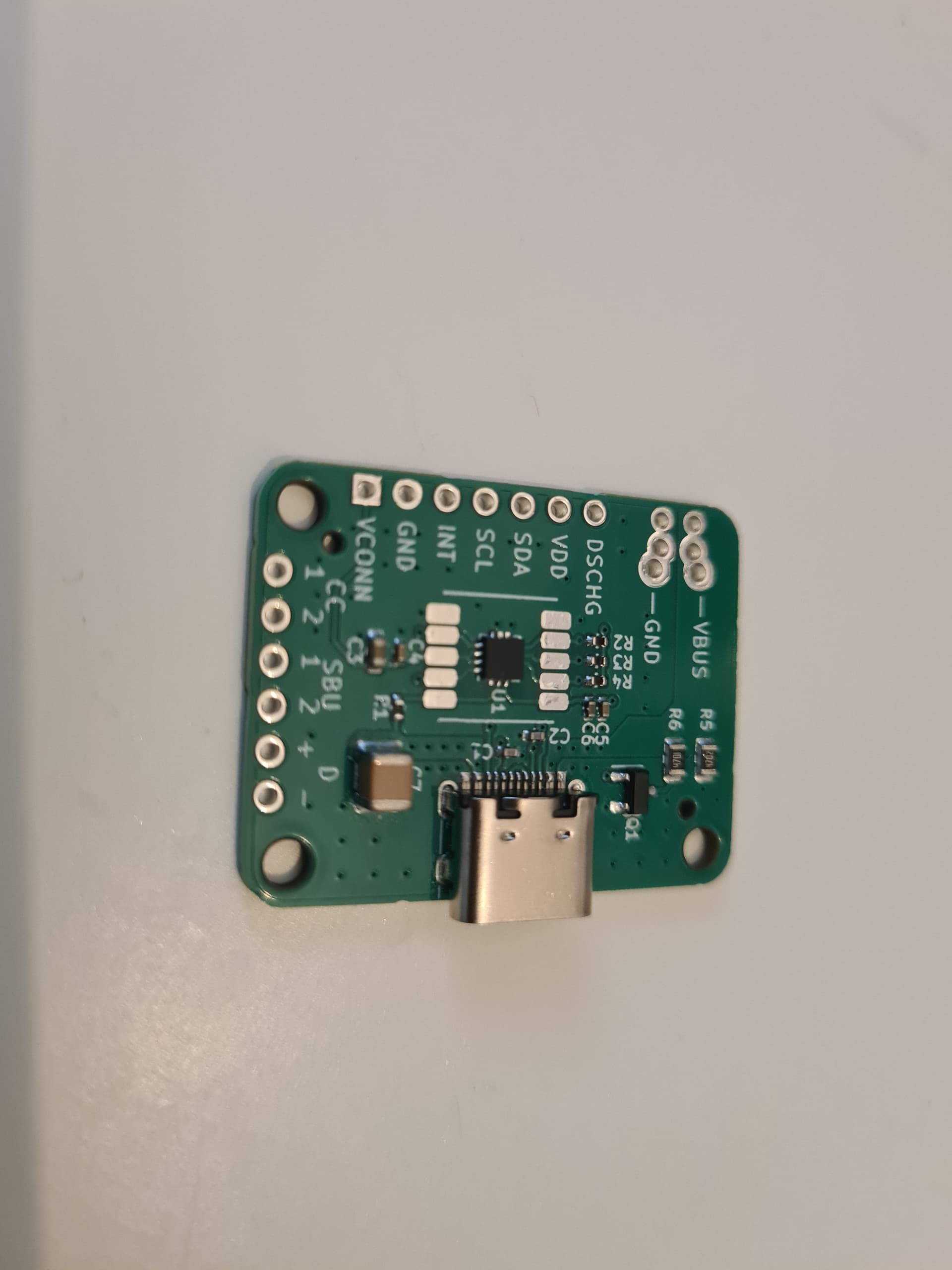
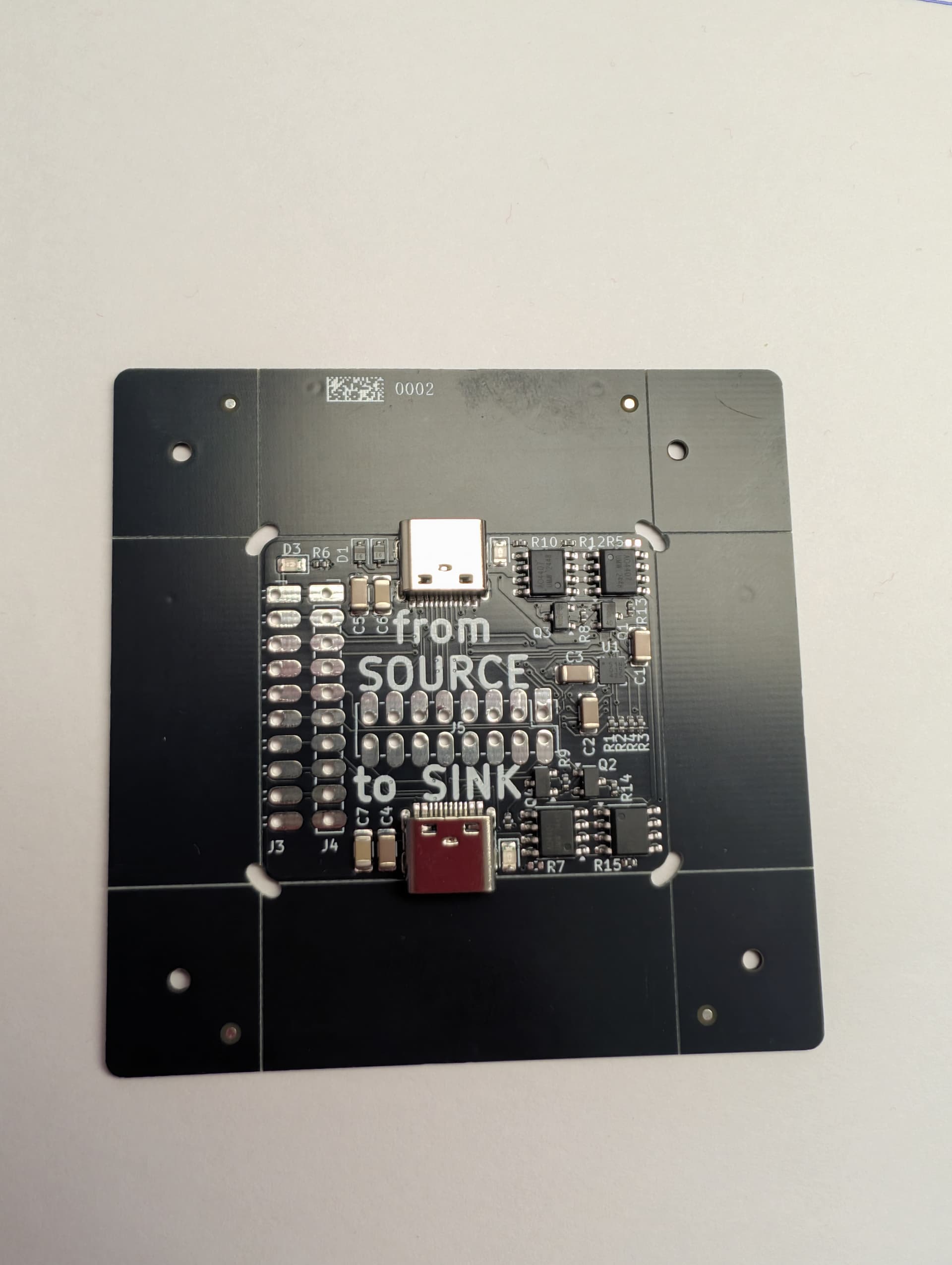
Boards are back, i2c is responding. Feels like progress!

4 Likes

Looks great. Really excited to learn how this all works!

2 Likes

This was a nice series about USB PD in Hackaday: All About USB-C | Series Of Posts | Hackaday Maybe some of that will be useful.

2 Likes

That was a good read, thank you.

Framework laptop got a good grade for USB C. I continue to love the framework, though I don’t travel with it because it’s a bit bulkier than the XPS13.

2 Likes

@ian am stalled on this project. There are probably issues with the HW design. Should I send some boards to you?

1 Like

Sure, I wouldn’t mind poking around a bit.

Reading up on USB C PD.

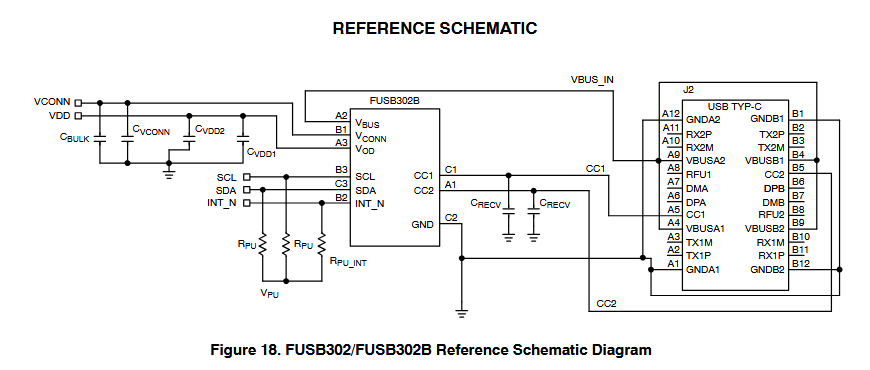
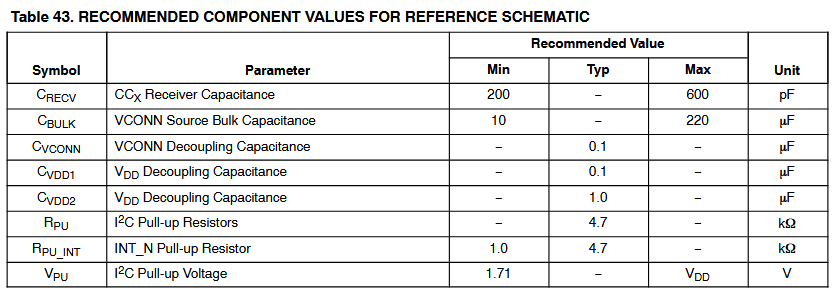
From FUSB302B datasheet:

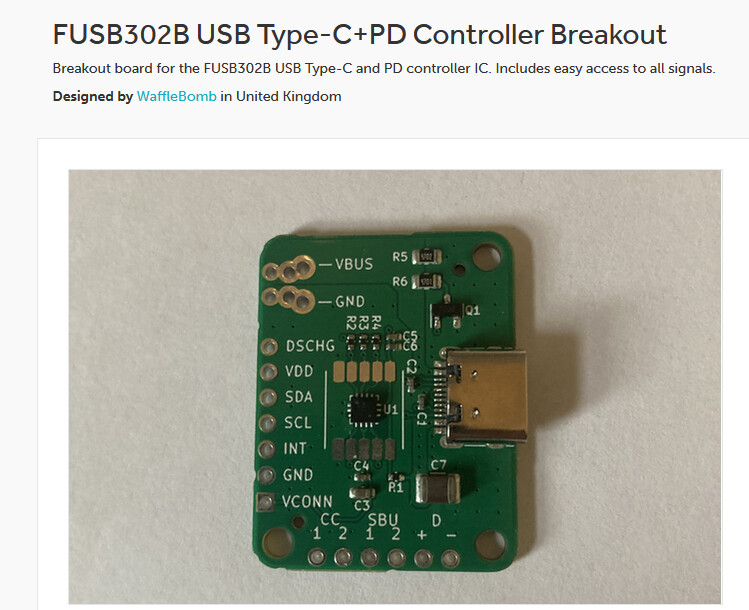
I ordered the only breakout I could find, just to get a feel for poking at the I2C interface:

1 Like

@ian nice one.

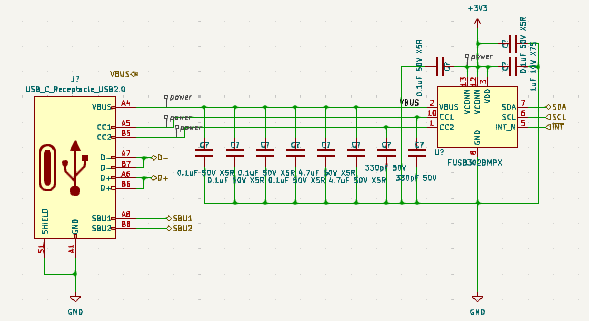
My efforts can be seen at GitHub - TomKeddie/bus-pirate5-firmware at tomk_20250504_usbpd

As I recall I added register defs and a dump function.

I think there is a problem with power bleed with 2 supplies being present. Seem to remember that connecting the supplies in a certain order caused reset issues.

My board is at prj-pcb-experiments/2025-usb-pd-plank at master · TomKeddie/prj-pcb-experiments · GitHub

1 Like

Ah, thank you so much. I didn’t realize you were using PTN5110, I saw FUSB302B above and had been looking at that.

1 Like

Ian, I’m not sold on the PTN5110. It’s a fine pitch QFN that needs expensive assembly (from JLC anyway). It does support PD3.0 (long messages?). FUSB302B is PD2.0. I couldn’t get PTN5110 to report any messages but I think I was likely missing something important.

1 Like

Breakout board arrived. Going to try to get it talking.

1 Like

Reset

[0x44 0xc 0x1]
[0x44 0xb 0xf]
[0x44 0x6 0x0]
[0x44 0x9 0x7]

Reset, power up, enable interrupts.

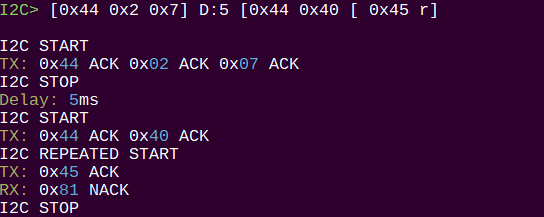
Determine CC1 or CC2

[0x44 0x2 0x7] D:5 [0x44 0x40 [ 0x45 r]

Is CC1 connected?

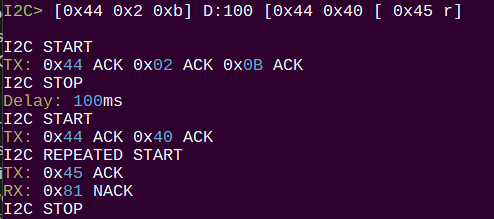
[0x44 0x2 0xb] D:5 [0x44 0x40 [ 0x45 r]

Is CC2 connected?

Bits 1:0!=0 indicate if the device is communicating on CC1 or CC2. Here it is on CC1.

Flipping the USB C cable at the breakout board puts it on CC2. Flipping the USB at the phone doesn’t seem to change anything - this is probably a bug that will bite me later.

Setup transmitter

[0x44 0x3 0x25]
[0x44 0x2 0x7]

Setup on CC1. PD2.0/3.0. Switch measure block to CC1.

[0x44 0x6 0x40] [0x44 0x7 0x4] [0x44 0xc 0x2]

Flush RX/TX, reset PD logic.

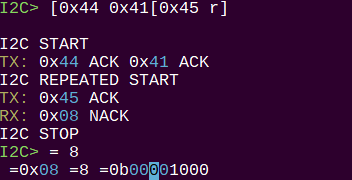
Read power profiles

[0x44 0x41[0x45 r]

Read RX buffer status.

Note: I had to replug the phone after configuration before there was anything in the RX buffer.

Bit 5 = 0 when message in buffer.

[0x44 0x43 [ 0x45 r:80]

Read the full 80 byte RX buffer.

Decoding

  • 0xe0 - start of message token
  • 0xa1 0x11 - message header, big endian

0x11a1 = 0b00010001 10100001

Bit Value Description
15 0 Extended (0 = Data message)
14-12 001 Number of Data Objects (1 + CRC)
11-9 000 Message ID
8 1 Port Power Role (1 = Source?)
7-6 10 Specification Revision
5 1 Port Data Role
4-0 00001 Message Type

Data Objects are 4 bytes each, and the message ends with a 4 byte CRC.

0x32 ACK 0x90 ACK 0x01 ACK 0x36

The single PDO object. Also big endian.

00110110 00000001 10010000 00110010

Current = Bits 9:0 = 00 00110010 = 50 * 10 = 500 = 0.5A
Voltage = Bits 19:10 = 0001 100100 = 100 * 50 = 5000 = 5V

Multiply current by 10 to get mA. Multiply voltage by 50 to get mV.

The phone is offering 500mA @ 5V. No other options are available.

1 Like

Next I tried to figure out how to read the e-marker in the cable. I assume the cable has one, it can as the charging cable for a Framework laptop and my phone can detect it when plugged in without a device on the other side.

There’s much less DIY info about e-markers. What I can gather is that it needs to be powered by VCON, which I tried enabling during the polarity tests for CC1/2 (measure CCx, VCON output to the other CCy pin). Nothing found this way.

Onsemi has a demo driver, but you need to signup to download it and I’m not that desperate for a cheat code yet :wink:

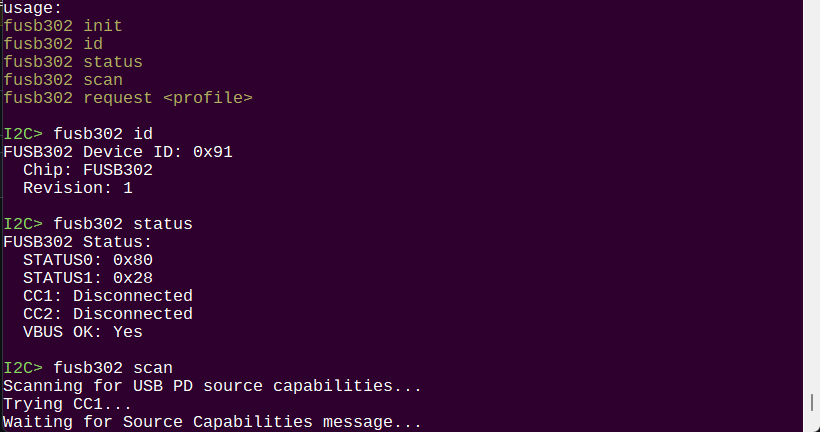
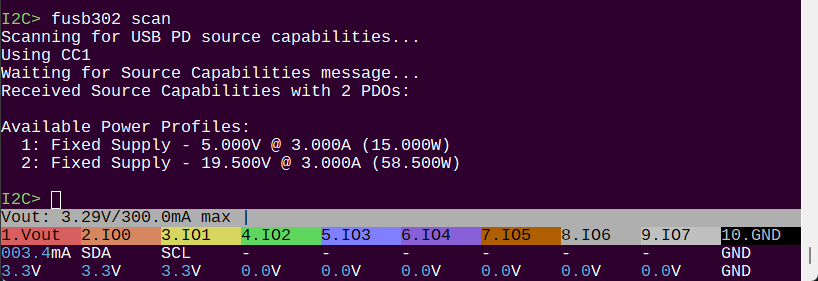
Some progress made on a command. The setup is incomplete so we can’t read the power profiles yet, but that’s next.

Got the PDO from my USB-C dock :slight_smile:

Code is an absolute mess, but I’ll clean it up and push.

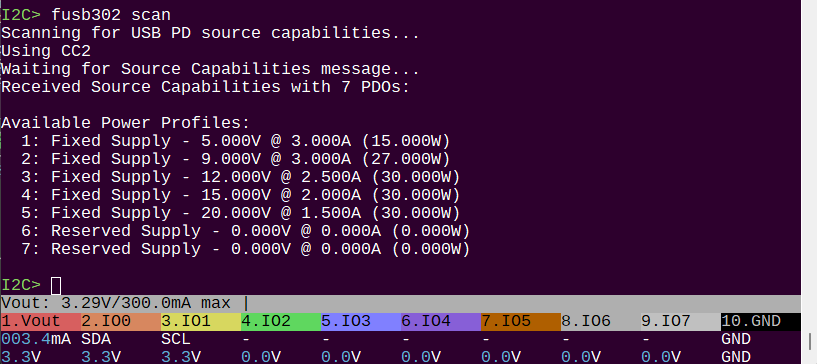
ETA:

PDOs for a very nice Chinese brand USB C charger.

2 Likes

OMG Ian, this is so beautiful. Can’t thank you enough for bringing this to life. Is a great feature for the BP to have.

2 Likes

Still in the poking it with a stick stage.

I read back through the thread to see what the ultimate goal should be. I picked up two main initial goals from your earlier posts:

  • be a Sink and read PDOs. Presumably trigger a profile with a hefty screw terminal out. This is in progress.
  • read emarkers. Working on this but there is so very little info outside reading the actual spec. I have a stab in the dark idea I’ll try tomorrow.

At the Glasgow link I saw goals for things like snooping. I presume this could be added later? I don’t want to get that far into the weeds on a rev 0.

Are there any other features I can investigate for rev 0?

Why do your board and the Glasgow proto have level shifters?

What is the purpose of the large double ganged FETs?

1 Like